

An elevation drawing is a flat, scaled view of one wall or one building face, drawn straight on. It shows heights, openings, materials, and everything sitting on that surface. There’s no perspective and no distortion, so you can measure a height right off the drawing. That’s the elevation drawing definition in one line.
Your floor plan can’t do that job. It tells the contractor where the vanity goes, and how much wall it takes up. It never tells him how high the mirror hangs above it.
In six years of running workshops for designers, I’ve heard the same install-day story more times than I can count. The room was right on the plan and wrong on the wall.
So when your contractor asks what an elevation drawing is on your set, he’s asking for one thing. He wants the document that answers his questions while you’re somewhere else, at another job or on a call.
Elevations get treated as an architect’s deliverable. They’re yours too, and on a renovation they’re often the only drawing that shows your actual design decisions.
This guide covers what goes on an elevation and the four types you’ll run into. It also covers how to read the ones that come back to you for approval. It ends with how to create one from a room you’ve already designed, without redrawing anything.
Table of Contents
How an elevation drawing differs from a floor plan
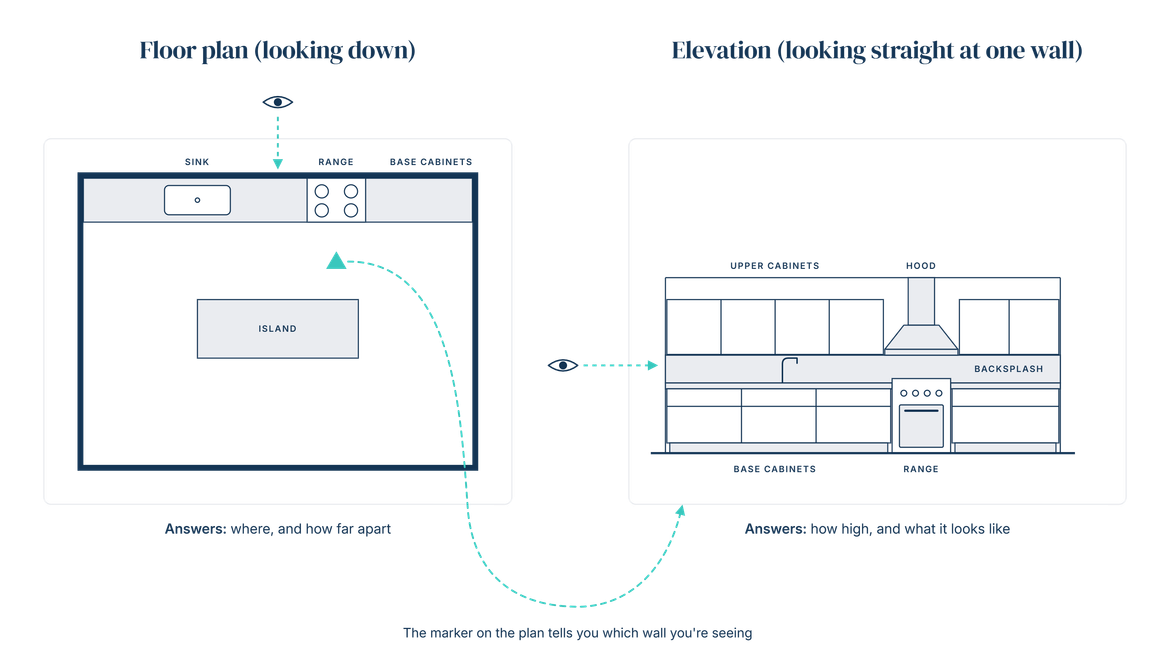
Picture the same kitchen twice. From above, you see the island, the sink, and the run of base cabinets. Stand in front of the range wall instead. Now you see what the plan never showed: the hood height, the upper cabinets, and where the backsplash tile stops.
That’s the whole difference. A floor plan looks down and answers where. An elevation looks straight at one wall and answers how high.
Here’s the version that settles most job site arguments. A 2D elevation drawing has no vanishing point, so every dimension on it is measurable. A section looks similar but cuts through the wall or the cabinet to show what’s inside. An elevation leaves the surface whole.
Some contractors and architects will call it an elevation plan. If one asks what is an elevation plan, he means this same drawing. Elevation plan and elevation drawing mean the same thing. So the elevation plan definition in practice is simple: one wall or one face, drawn flat and to scale.
Neither drawing works alone. The plan sends your cabinetmaker to the right wall. The elevation tells him what to build once he gets there.
For the full comparison of plan view, elevation view, and section, read our guide to how elevation, plan and section views differ.
The four types of elevation drawings you’ll run into
Search for types of elevation drawings and you’ll see “four types” everywhere. That usually means four compass faces around a building: the north, south, east and west elevations. Other firms label them by position instead, so you get front, rear, left and right, read as you stand facing the entrance. Either way, that’s one kind of drawing walked around the building.
These are the four that actually behave differently, ordered from outside in.
Exterior elevations
A building elevation drawing shows one outside face of a structure. You get the grade line where the building meets the ground, the window and door openings, the roof shape, and the exterior materials. A house usually gets four of them, one per side. You’ll see the same sheet called an architectural elevation drawing, or just “the exteriors,” depending on who drew it. An elevation drawing in architecture follows the same logic as yours, at a bigger scale.
You won’t draw many of these yourself. You will read them on new builds and additions, usually to check window head heights before you spec any window treatments.
Interior elevations
This is the one you’ll draw constantly. An interior elevation shows a single wall inside a single room, with the cabinetry, fixtures, trim, and finishes that live on it.
The unit is the wall, not the room. A kitchen with cabinetry on three walls needs three elevations, each dimensioned on its own. The run on one wall tells your installer nothing useful about the next one. Each drawing gets keyed back to the floor plan with a marker, which is covered further down.
Kitchens, bathrooms, fireplaces, and built-ins are where you’ll use them most, and where the money goes. A room with nothing but paint and a light fixture rarely needs one. A room full of custom millwork needs one per wall.
Detail elevations
A detail elevation zooms into one element and draws it larger, because the standard drawing can’t hold enough information. Think of a custom range hood surround, a mantel profile, or a tile pattern that has to start from one specific point.
The trigger is simple. If the finished look depends on a dimension too small to read at your normal scale, that element needs its own drawing.
Detail elevations also protect the parts of a design that get value engineered quietly. A mantel drawn at a larger scale, with its profile and returns dimensioned, is much harder to substitute for something close enough.
Cabinet and millwork elevations
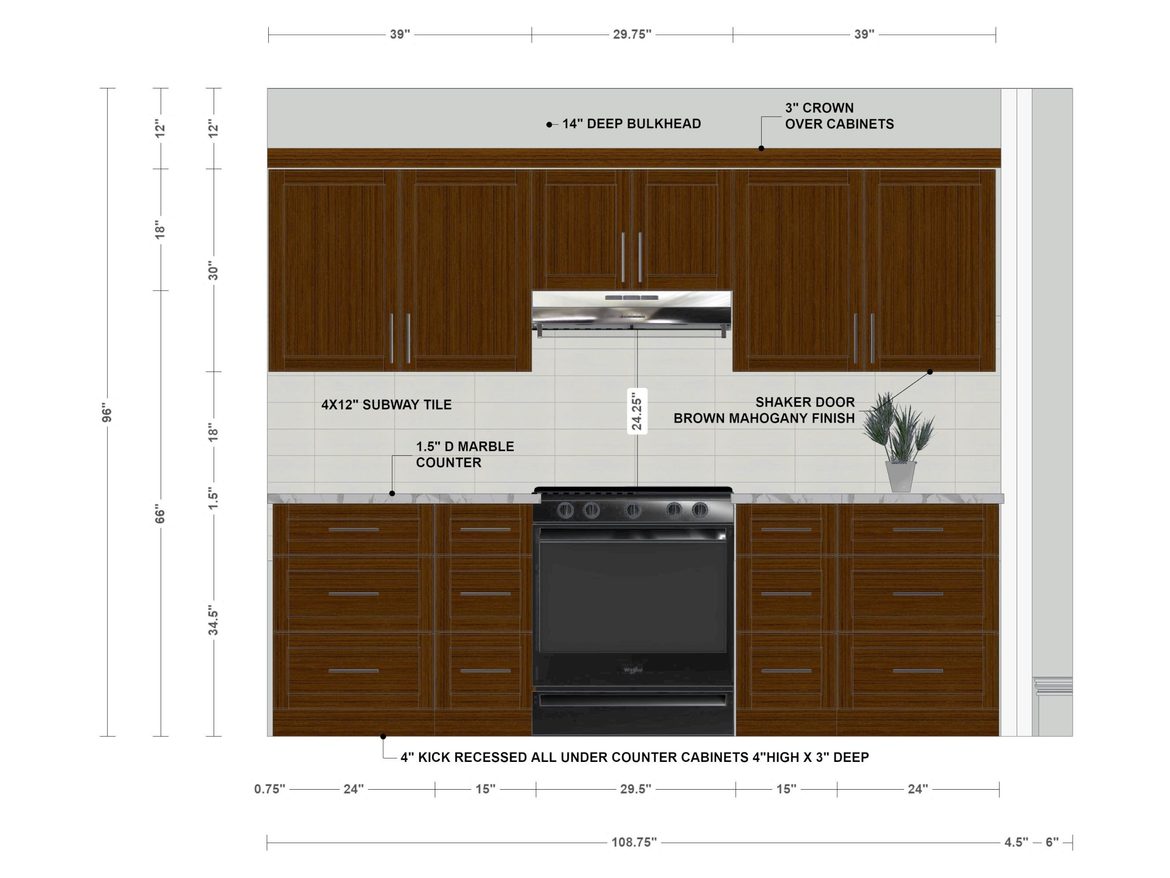
Cabinet and millwork elevations go further than the wall itself. They show door and drawer splits, filler positions, toe kick height, hardware placement, and counter and backsplash heights.
Why separate them out? Your cabinetmaker prices and builds from this drawing. A gap here doesn’t stay a gap. It becomes a phone call, a guess, or a change order once the run is already in the shop.
The level of detail climbs accordingly. Where an interior elevation might show a bank of drawers as one block, a millwork elevation shows each drawer face, each reveal, and the pulls. Your shop will also want to know which way the grain runs.
What goes on an elevation drawing
An elevation earns its keep by answering questions before anyone has to ask them. Four things do that work: dimensions, materials, fixtures, and the reference marks that tell whoever opens the sheet what she’s looking at.
Every one of them is a decision you’ve already made. The drawing is where those decisions become measurable instead of implied. Leave one out and someone on site decides it for you. He’ll pick whichever version is fastest to install.
“You might find that you want to add additional measurements to make certain details very clear to your contractor.” — Sheilah MacSporran, CEO, DesignFiles

Dimensions and heights
Vertical dimensions are the point of the drawing. Every one of them gets measured from the finished floor. On the sheet that’s written as AFF, short for above finished floor.
The heights you’ll specify most often:
- Countertop height
- Underside of the upper cabinets
- Centerline of a mirror or a pair of sconces
- Where tile or wall panelling stops
One warning worth taking seriously. If the finished floor thickness isn’t accounted for, every height on that wall shifts by the thickness of the tile. For standard residential heights to work from, see our guide to kitchen dimensions.
Materials and finishes
Finishes show up as hatch patterns or tags, and each one points to a finish schedule or spec sheet.
An untagged hatch is decoration. Nobody can order from it.
On residential projects you can keep this lightweight. A callout naming the material in plain words works fine. Write “walnut mantel” or “honed marble slab,” then make sure it matches your schedule word for word.
Mismatches are where finishes go wrong. If your elevation says “brushed brass” and your spec sheet says “aged brass,” somebody picks one. Use the same name in both places, every time.
Fixtures and fittings
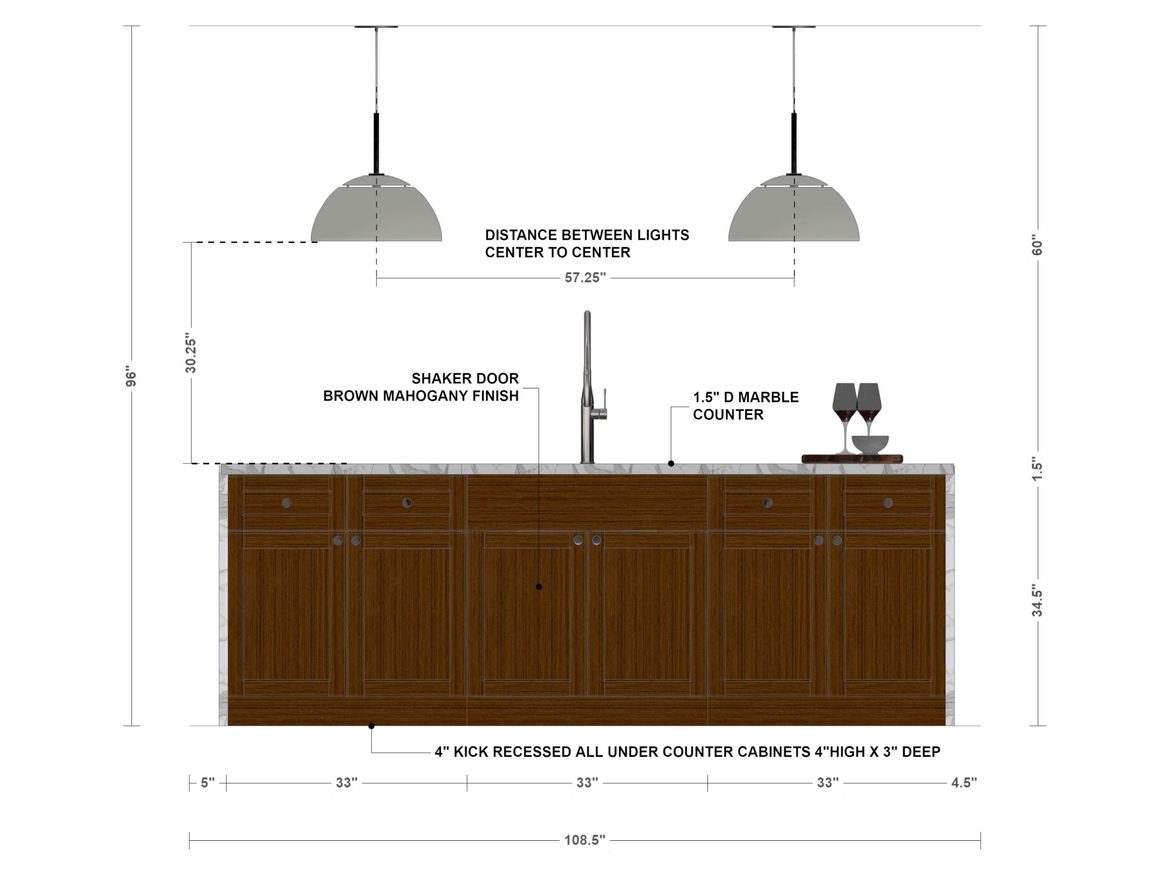
Sconces, mirrors, faucets, towel bars, outlets, switches, appliances, hardware. Everything that sits on the face of the wall belongs on the drawing.
This is where install errors hide. Your plan shows the electrician where a sconce goes horizontally, and then says nothing at all about height. So he uses his default. You get sconces at 66 inches when your mirror needed them at 72, and the drywall is closed before anyone notices.
Draw the fixture where it lands on the face, then dimension to its centerline. Add anything that has to align with something else. The outlet that clears the backsplash. The towel bar that lines up with the vanity edge.
Labels, elevation markers and scale
A drawing that can’t identify itself is useless once it leaves your desk. Every elevation needs a title naming the room and the wall, a scale, and a matching marker on the floor plan.
The marker is the link between the two sheets. It’s an arrow pointing at the wall being drawn, labelled with the sheet it lives on. Elevation drawing symbols like this one are worth knowing, and our guide to 36 floor plan symbols covers the rest.
Interior elevations get drawn at a larger scale than building elevations, since the details you’re documenting are smaller.
How to read an elevation drawing without guessing
Elevations don’t only leave your office. They come back. Your architect sends a set, your cabinetmaker sends shop drawings, and someone needs to catch the mirror that’s been drawn four inches too low.
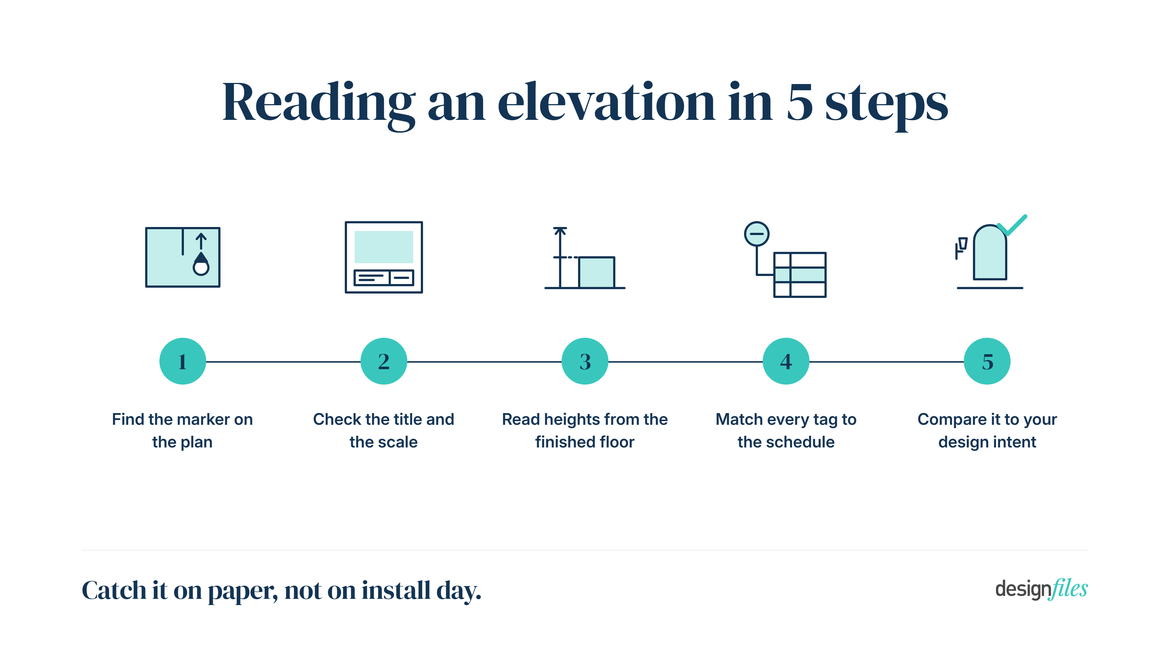
That someone is you. Here’s how to read an elevation drawing in five passes, in the order that catches problems fastest.
- Find the marker on the plan. Before anything else, work out which wall you’re looking at and which way you’re facing. A drawing labelled “A2” means nothing until you find A2 on the plan.
- Check the title and the scale. The title confirms the room and the wall. The scale tells you whether you can measure off the sheet or whether it’s marked NTS, not to scale.
- Find the datum and read heights from it. On interiors, that’s the finished floor. Every AFF dimension climbs from that line, so confirm it’s the finished floor and not the subfloor.
- Match every tag to the schedule. Each hatch, code, and callout should resolve to a real entry. A tag that leads nowhere is a question someone will ask you at the worst possible moment.
- Compare it against your design intent. Now look at it as the designer. Are the sconces centred on the mirror? Does the tile land on a full course? Do the cabinet runs align where you wanted them aligned?
The fifth pass is the one that matters. The first four confirm the drawing is complete. Only the last one confirms it’s your design.
Mark up what’s wrong rather than describing it. A redline on the drawing itself, with the corrected dimension written next to the old one, gets fixed. An email saying the sconces look low gets read and forgotten.
Want to go deeper? Our Elevations 101 workshop walks through reading and building elevations in 50 minutes.
Elevation drawing examples and templates
Use the examples below as a checklist against your own drawings, not as something to trace. Each one shows the minimum information a reader needs to build from.
Both are deliberately plain. A drawing that looks impressive and can’t be measured is worth less than a rough one with every height called out.
A simple elevation drawing example
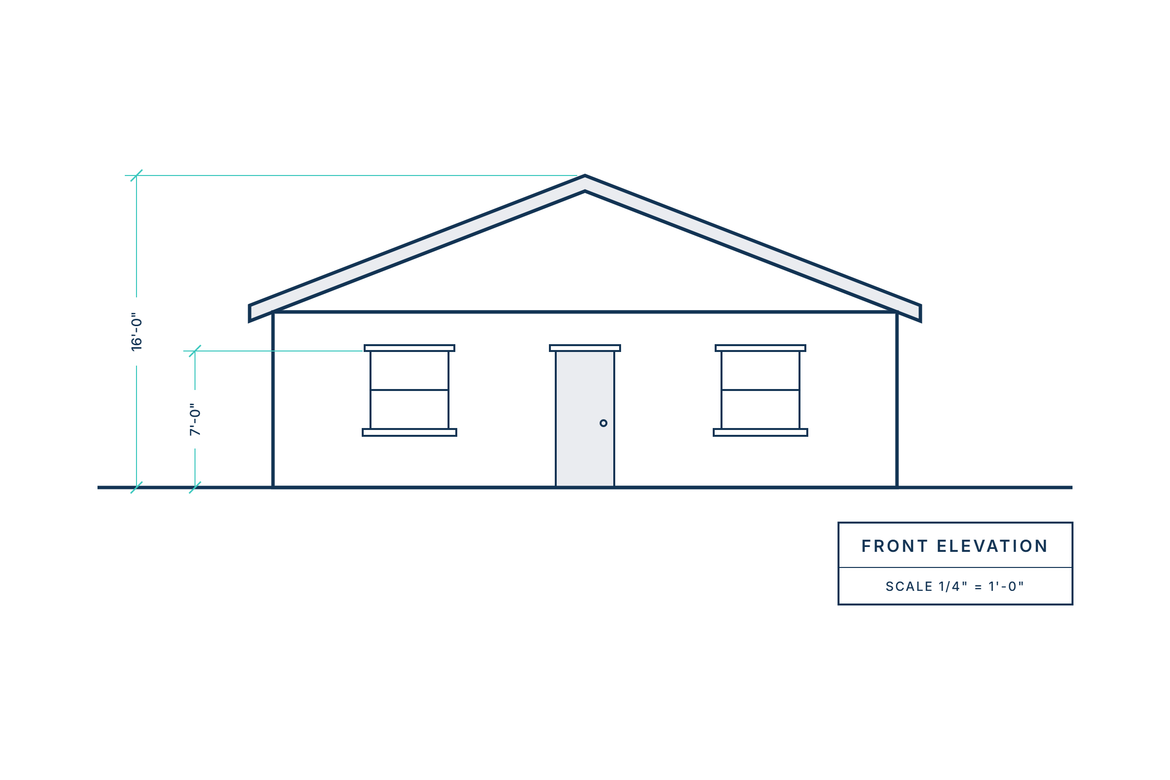
Start with the simplest version there is. Here’s an elevation drawing example of a small house face. Grade line at the bottom, two windows, a door, the roof outline above, and two vertical dimensions.
Four things make it readable. The grade line gives you a datum. The dimensions run from it. The openings are drawn at their real sizes. And the title block tells you which face you’re looking at.
Nothing here is decorative. Strip a simple elevation drawing back this far and it still works. You can price it, build from it, and check it against the finished wall.
A wall elevation drawing example
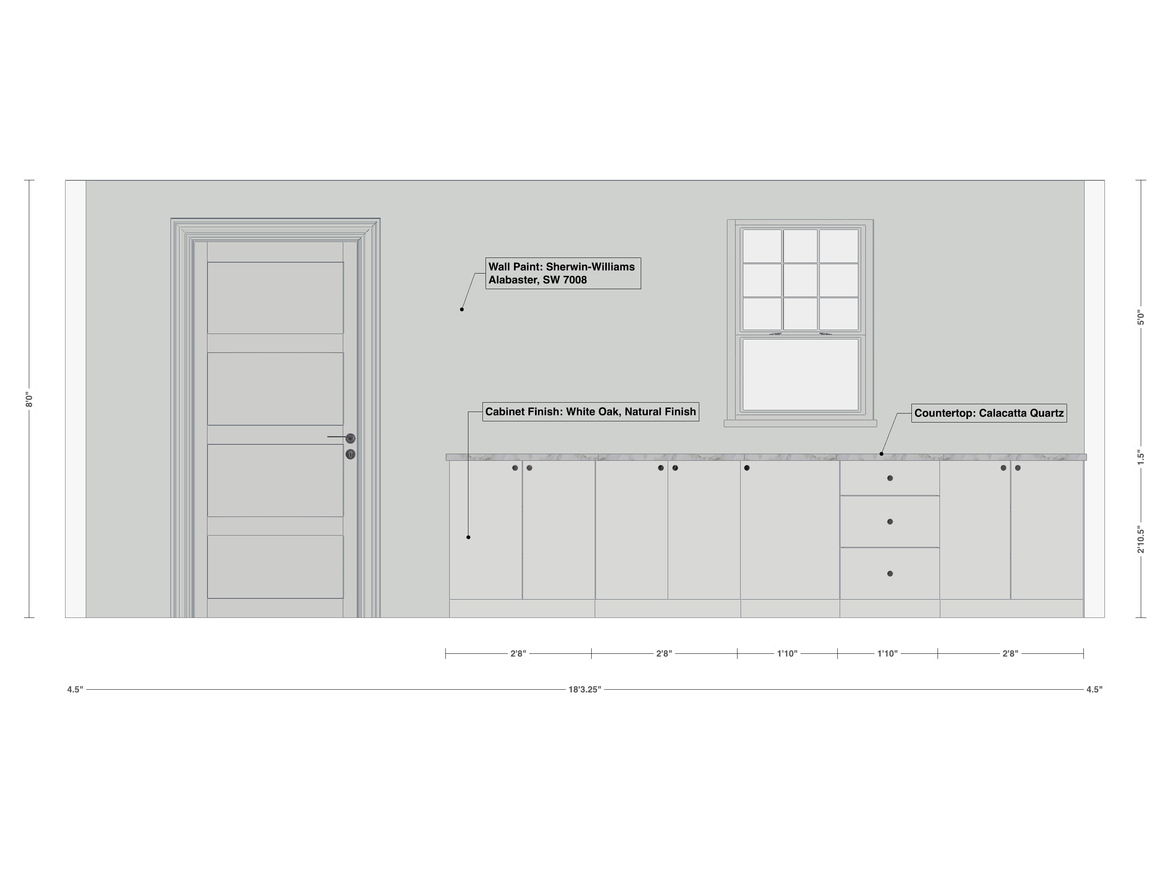
Now the interior version. A wall elevation drawing of a generic room shows a window, a door opening, a run of base cabinets, and a counter. Heights are dimensioned from the finished floor, and a few material tags sit on the face. This example was created using DesignFiles.
Notice what’s doing the work. The datum sits at the finished floor. The dimension strings stack consistently instead of scattering around the drawing. Every tag resolves to a schedule entry.
Strip any one of those out and the drawing starts generating questions instead of answering them.
Keep your own versions this plain. Styling belongs in your presentation, not on the sheet your tile setter works from.
What to include in an elevation plan template
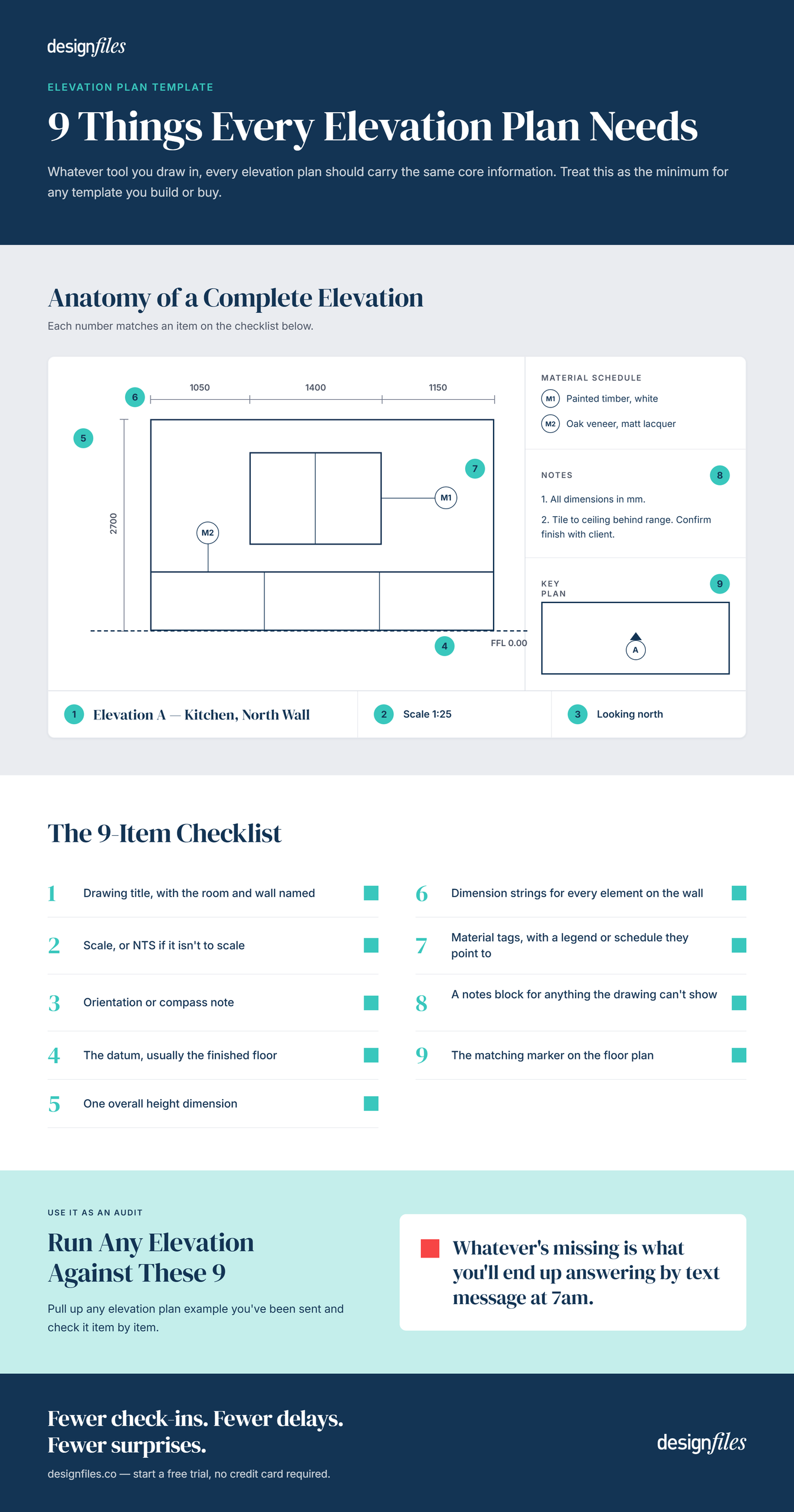
Whatever tool you draw in, every elevation plan drawing should carry the same core information. Treat this as the minimum for any template you build or buy:
- Drawing title, with the room and wall named
- Scale, or NTS if it isn’t to scale
- Orientation or compass note
- The datum, usually the finished floor
- One overall height dimension
- Dimension strings for every element on the wall
- Material tags, with a legend or schedule they point to
- A notes block for anything the drawing can’t show
- The matching marker on the floor plan
That list is also a decent audit tool. Pull up any elevation plan example you’ve been sent and run it against these nine items. Whatever’s missing is what you’ll end up answering by text message at 7am.
Who reads your elevation after it leaves your desk
Your elevation is only as good as what someone else can build from it without calling you. Four people will open that drawing, and each one needs something different from it.
Draw for all of them at once and you end up with a sheet that’s cluttered for your client and thin for your cabinetmaker. Knowing who reads what is how you decide where the detail goes.
The designers I’ve seen get the smoothest installs don’t send more drawings. They send elevations that answer the contractor’s next question before he calls.
“It’s going to make it a lot easier for you to send over those detailed documents to any contractor you’re working with, to make sure that they are installing everything exactly as you had planned in your overall designs.” — Sheilah MacSporran, CEO, DesignFiles
Working on kitchens, baths, or built-ins? Our guide to interior elevation drawings shows what to label on each wall.
Contractors and installers
Your general contractor and his trades pull rough-in heights off the elevation. The electrician takes outlet and switch positions. The plumber takes the vanity and faucet heights. The tile setter takes the layout and the stopping points.
In one of my workshops, a designer walked us through a bathroom she’d planned down to the sconce. The floor plan was perfect. The electrician roughed in the sconces at his usual height, a few inches above where her mirror would hang. Drywall closed before anyone caught it. She now sends an elevation for every wall with a fixture on it. Two years on, she hasn’t had a repeat of that particular phone call.
There’s more on keeping that relationship smooth in our guide to how interior designers work with contractors.
Cabinetmakers and millworkers
Your cabinetmaker reads the elevation as a build document. He needs the highest level of detail on your set: door and drawer splits, fillers, hardware, toe kick, and how the run meets the ceiling.
He’ll send his own shop drawings back to you for approval before anything gets cut. That’s when your reading skills earn their money, because approving a shop drawing means you own what’s on it.
Check the splits against your elevation, then check the fillers. A run that loses an inch has to lose it somewhere specific. You want to be the one choosing where that inch comes off.
Architects and your client
On projects with an architect, your interior elevations sit alongside her set. The two have to agree on ceiling heights, window heights, and anything structural. When they disagree, the discrepancy surfaces on site, usually at the worst time.
Your client reads the same drawing differently. She sees the wall before it’s built, at the right proportions, with the tile stopping where you said it would. Renderings sell her the feeling. The elevation shows her the commitment.
That’s often what turns a vague “I think so” into an approval you can order against.
How to create an elevation drawing from a design you’ve already built
You’ve already designed the room. Then you open a drafting program and build the same kitchen a second time, just to draw one wall.
I’ve watched designers rebuild a finished kitchen in a second program just to draw one wall. That’s the step I’d cut first.
DesignFiles removes it. Designers have created 4M designs on the platform, which means the room usually exists in 3D long before anyone needs an elevation of it. The elevation drawing feature is built into the 3D Floor Planner, so the elevation becomes a view of the design you already made.
If you already draft fluently in CAD, that route still works fine. The question is whether the second build is worth the hours.
Our comparison of elevation drawing software weighs the options side by side.
Start from your 3D design
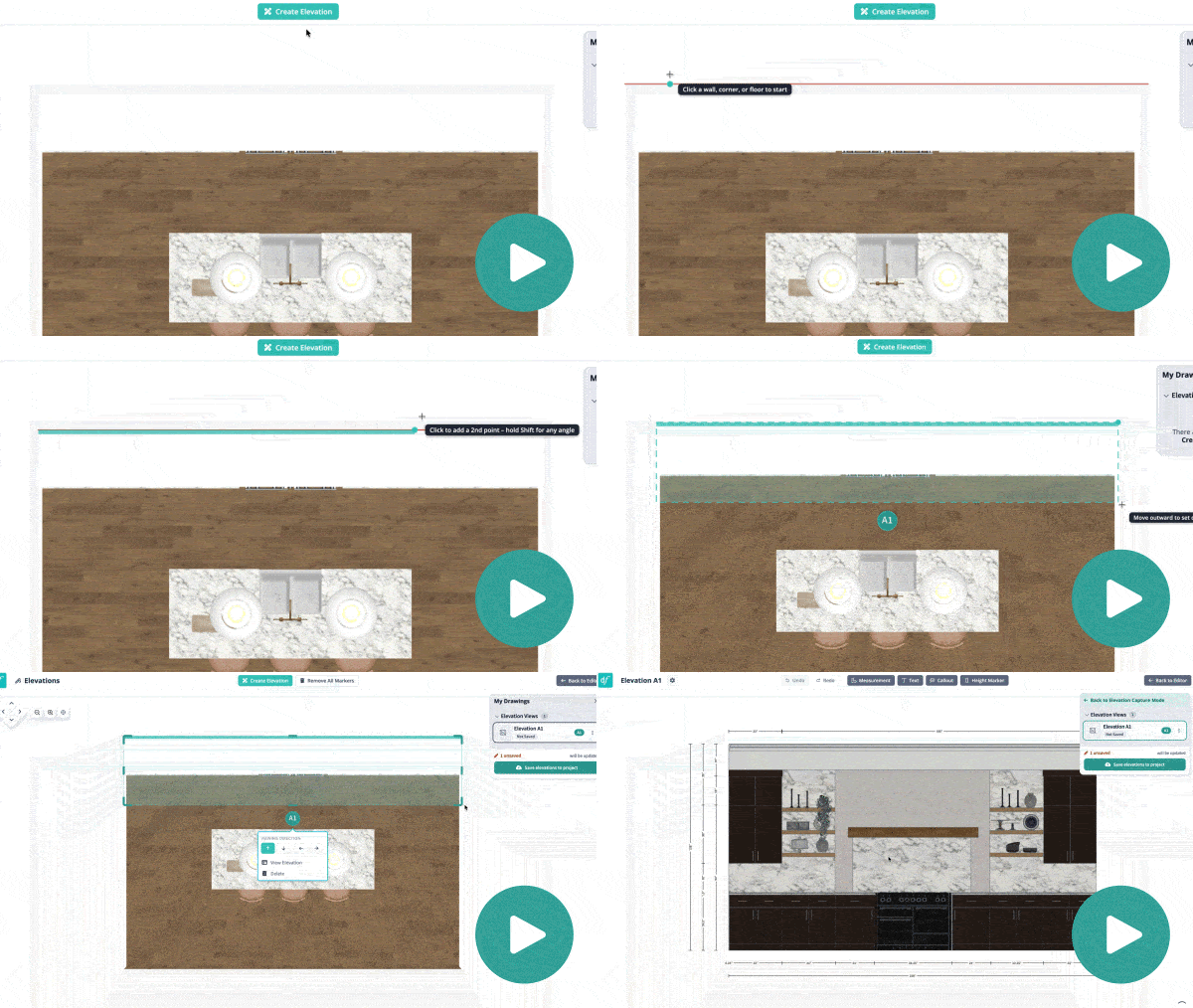
Open a room you’ve built in the 3D Floor Planner and click the elevations button at the top of the editor.
The view switches to a top-down version of your design, which is the view you’ll work from. Everything you’ve already placed stays exactly where it is.
The tutorial video uses a kitchen with a back wall of cabinets and an island. It captures three elevations from that one design: the cabinet wall, and the island from both directions.
Capture the wall you want to show
Click “create elevation,” then click your first point on a wall, corner, or floor. Click the far end, drag outward to set how much depth gets captured, and click to release.
An arrow shows the viewing direction, and you can flip it by clicking a different arrow. Each elevation gets a label like A1, A2, or A3, and you can rename it to something readable like “north wall.”
Capture every wall with a fixture, a cabinet, or a finish transition on it. Back to the earlier rule: the unit is the wall.
Add measurements, callouts and height markers
Now annotate. The measurement tool has snapping on by default, so your points land exactly on the lines you’re measuring between.
You’ve got four tools, and each maps to something from the list further up this page:
- Measurements for dimension strings
- Text notes you can move, rotate, and restyle
- Callouts with a leader line, for naming a material like “walnut mantel”
- Height markers that read the distance from the floor automatically
You can also switch between solid, outline, and combined display styles, and turn guidelines on to connect measurements to the items they describe.
“Let’s say that I wanted to indicate to my contractor the distance from the floor to the bottom of this mantel. … This will automatically indicate what the distance is between the floor and wherever it is that you’ve clicked.” — Sheilah MacSporran, CEO, DesignFiles
Save and share it with your contractor
Click save to add your elevations to the project. Each becomes its own design page.
Exiting without saving doesn’t lose your work. The elevations stay in the design. Saving is what turns them into project pages.
That’s the part that matters for the handoff. Your elevations now sit in the same project as your spec sheets and FF&E schedules. Your contractor gets one link, not five attachments.
Draw the walls that carry your design, then send them. If you want help with your first set, explore our Elevations feature for more details or book a free 1-on-1 training session with our team.
Elevation drawing FAQs
Draw the wall straight on, with no perspective, so every dimension stays measurable. Keep one scale per sheet. Measure every height from the finished floor. Tag each material so it resolves to a schedule entry. Vary your line weights, with the heaviest on the outline, so the drawing reads clearly. And give every elevation a title and a marker on the floor plan.
One per wall that carries design information. A powder room with a vanity on one wall and nothing elsewhere may need one. A kitchen with cabinetry on three walls plus an island needs four or five, because each run has to be dimensioned separately. Skip the blank walls. Draw anything with cabinetry, plumbing, lighting, built-ins, or a finish change on it.
Interiors get drawn larger than building elevations, since the details matter more and the surfaces are smaller. A half inch to the foot is common for interior and millwork elevations, against a quarter inch to the foot for a building face. Detail elevations go larger still. Whatever you choose, put the scale on the sheet, or mark it NTS if the drawing isn’t measurable.
An elevation looks at a surface that stays whole. A section cuts through it and shows what the cut exposes. Stand in front of a cabinet with the doors closed and draw what you see, and that’s an elevation. Slice through the same cabinet and draw the shelves, the carcass, and the depth inside, and that’s a section.
AFF stands for above finished floor. It means the height is measured from the top of the finished floor, after flooring is installed, rather than from the subfloor. A note reading “sconce 72 inches AFF” tells the electrician exactly where the centerline sits. The distinction matters, since tile, wood, or carpet thickness can move every height on the wall.

![2027 Interior Design Conferences & Tradeshows [Ultimate List]](https://blog.designfiles.co/wp-content/uploads/2024/11/interior-design-events-768x512.jpeg)