
Ever feel resentful about the profit you made on a project compared to the time and effort you put in? Your interior design project management software might be to blame.
It’s never fun to calculate your project profits only to realize that you were well below your benchmark.
But you should know you’re not alone in this. Many designers have reached this point, and 99% of the time, the culprit is inefficiency in your tools and processes.
Here’s how to determine if that’s your issue.
Are you:
😡 Spending a tonne of time on double entry?
😡 Having a hard time keeping track of what still needs to be done?
😡 Bouncing between multiple programs to manage tasks?
😡 Fielding a constant onslaught of client communication by phone, text, email, …etc?
😡 Feeling generally unorganized and all over the place?
If you answered yes to any of the above, it’s a red flag that your current processes and tools are causing you to bleed profits and affect your professional image.
“I fought systems for years, because I thought being creative meant I could not follow protocols. Rigid systems got projects delivered on time and made clients happier. They also gave me back real time to be creative.” — Kimberley Seldon, Founder, Business of Design
Good news: the fix is almost always consolidation.
In six years of running workshops for interior designers, the question I hear most isn’t which software is best. It’s which of the three tools they already pay for they’re allowed to cancel.
That’s the question this guide answers. I tested eight platforms hands-on. Rather than ranking them by feature count, I’ve organized everything around what your software has to do at each stage of a real project. Intake and contracts. Design and approvals. Tasks, calendar, and your team. Ordering, installing, and closing out.
A feature list tells you what a tool has. It won’t tell you when you’ll need it, and that gap is exactly where designers pick wrong.
One change since the last update: Houzz Pro has joined the list. It’s the largest platform in the category, and leaving it off wasn’t doing you any favors.
Let’s find yours.
Table of Contents
How we selected these tools
Five things decided what made the cut, and none of them were marketing budgets.
- Real designer input. I ran a survey in the DesignFiles Facebook community, which has over 11,000 active interior designers. The tools on this list are the ones designers actually mentioned using, not platforms that just show up in paid ads.
- Review volume. A high number of reviews on platforms like Capterra and G2 signals that real professionals are using a tool consistently enough to form an opinion. We factored in both the rating and the number of reviews, because 4.9 stars from 8 people tells a different story than 4.6 stars from 500.
- Interior design specificity. Generic project management tools didn’t make the cut. Every platform here was built for or meaningfully adapted to the way interior design businesses actually operate, including things like product sourcing, spec sheets, and client design approvals.
- Hands-on testing. I personally tested each platform. The observations in each review come from real time spent inside the software, not from reading the marketing page.
- A full project run. I didn’t assess these against a feature list. I assessed each one against a complete project, from the first questionnaire through to the final invoice. I was looking for the point where it stops being useful and you have to open something else. That point is different for every platform on this list, and it’s the thing that should decide your choice.
New this update: Houzz Pro. It’s the biggest platform designers in this category actually use, and a list that skipped it was an incomplete list.
What design project management software should handle
Before you open a single pricing page, you need a standard to judge these platforms against. Here’s the honest version of what your work requires.
The six workstreams that have to stay in sync
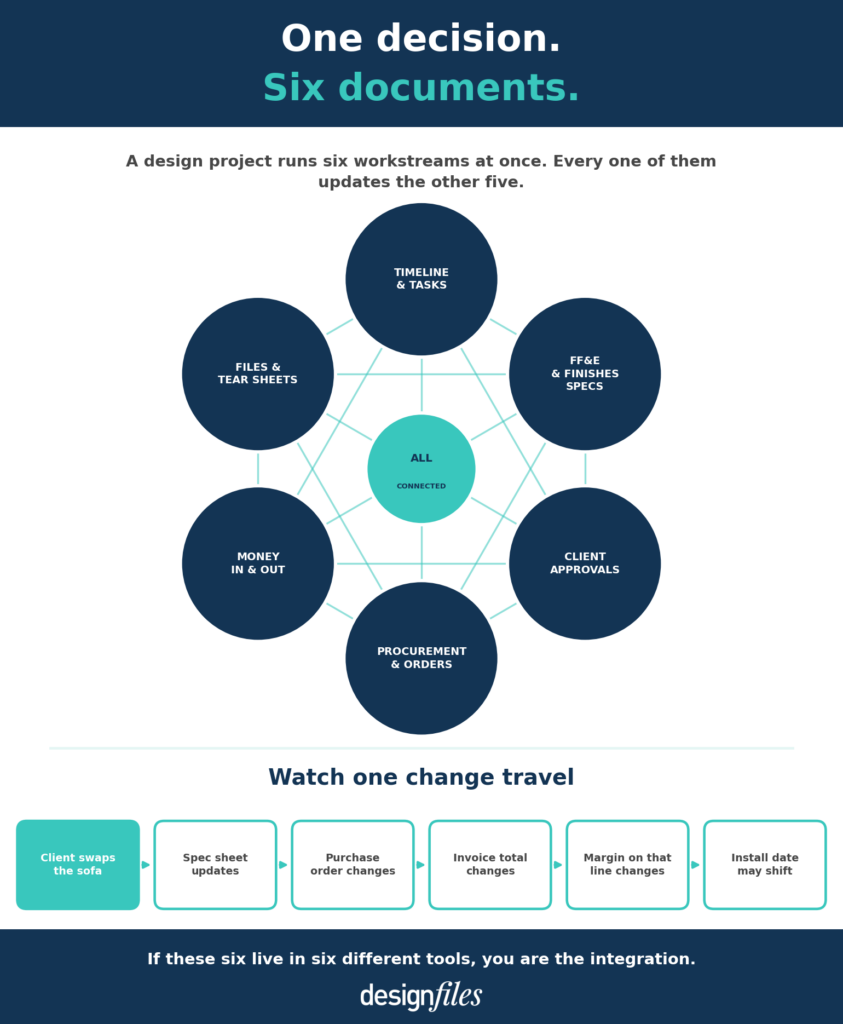
A design project runs six things at once:
- The timeline and the tasks inside it
- FF&E and finishes specifications
- Client approvals and feedback
- Procurement and order tracking
- Money in and money out
- The files, tear sheets, and images everything references
Any one of these fits happily in a spreadsheet. That has never been the problem.
The problem is that they update each other, constantly.
Picture a client approving the sofa, then changing her mind about the sofa two weeks later. That single swap changes the spec sheet. It changes the purchase order. It changes the invoice total, your margin on that line, and quite possibly your install date. Six documents, one decision, and no system telling you which ones you missed.
One designer in a workshop last year walked me through her setup. Asana for tasks, a shared spreadsheet for FF&E, Dropbox for tear sheets, QuickBooks for invoices. She wasn’t disorganized. She was meticulous. The trouble was that one approved substitution meant four separate updates, and she was doing that math at ten at night after her kids went to bed.
Why a schedule in design is not a timeline
Here’s the bit of vocabulary that trips up every generic project tool on the market.
In interior design, a schedule is a specification document. It isn’t a calendar. You already know this. Software companies frequently do not.
The schedules you actually produce:
- FF&E schedule
- Finishes schedule
- Lighting schedule
- Hardware schedule
- Plumbing fixtures schedule
- Millwork schedule
When a platform hears the word “schedule” and hands you a Gantt chart, that’s your signal. It was built for construction crews or marketing teams, not for you. That’s the real reason Monday, Asana, and ClickUp keep disappointing designers who try them. They handle the timeline beautifully and have absolutely nowhere to put a spec sheet.
What your current setup is actually costing you
Let’s do some quick math. Your numbers, not made-up ones.
Line one: add up every monthly software subscription you’re paying for right now. All of them. The design tool, the invoicing tool, the file storage, that CRM you signed up for in January.
Line two: estimate the hours per week you lose entering the same information twice. Multiply by your own hourly rate.
Line three: add the cost of one sourcing or ordering mistake per quarter. A wrong SKU, a missed lead time, a reorder you quietly ate.
Now compare that total to the price of one platform.
Every time I’ve watched a designer add up her real software cost, the subscription line turns out to be the smallest number on the page.

The best interior design project management software
I’ve tested every platform on this list hands-on, so you don’t have to spend weeks trialing software that isn’t right for your business. Before we get into the full reviews, here’s a side-by-side look at how these tools compare across the criteria that matter most.
The first table covers the basics: who each tool is built for, how it’s rated by real users, what it costs to get started, and whether you can try it before you commit. A quick note on ratings. I’ve included the number of reviews alongside the score, because 4.9 stars from 10 people and 4.6 stars from 535 people are not the same thing.
| Tool | Best for | Capterra rating | Starting price | Free trial |
|---|---|---|---|---|
| 1. DesignFiles | Solo designers + small firms, all-in-one | 4.6 (535 reviews) | $49/mo + $25/user | Yes, 1 project |
| 2. Studio Designer | Large firms needing built-in accounting | 3.0 (2 reviews) | $72/user/mo | No |
| 3. Houzz Pro | Solo designers who need leads too | 4.1 (59 reviews, G2) | $249/year | Yes |
| 4. Programa | Studios living in FF&E and procurement | 4.8 (11 reviews, G2) | $59/user/mo | Yes, 7 days |
| 5. Mydoma Studio | Designers wanting flexible project tools | 4.2 (79 reviews) | $64/user/mo | 15 days |
| 6. Design Manager | Large firms, advanced accounting only | Not rated | $79/user/mo | 30 days |
| 7. Gather | Mid–large firms, complex spec work | 4.9 (10 reviews) | $99/mo (2 users) | 30 days |
| 8. Dubsado | Creatives needing CRM + automation | 4.3 (50 reviews) | $35/mo | Yes, 3 clients |
| 9. Spoak | Homeowners + beginner designers | Not rated | $14.99/mo | 7 days |
Here’s how to actually use the second table. Find the column where you currently pay for a separate tool. Design tools, project management, client and payments, or accounting. That column decides whether switching saves you money or simply moves it around.
The second table goes deeper on features, broken down into four categories: design tools (moodboards, floor plans, clipper), project management (tasks, calendar, time tracking), client and payments (portal, contracts, invoicing, QuickBooks), and accounting. “Full” means the platform covers all the key features in that category. “Partial” means there are meaningful gaps worth knowing about before you sign up. “None” means you’d need a separate tool entirely.
| Tool | Design tools | Project management | Client + payments | Accounting |
|---|---|---|---|---|
| 1. DesignFiles | Full. Boards, plans, clipper | Full. Tasks, calendar, time | Full. Portal, contracts, QB | Via QB sync |
| 2. Studio Designer | Full. Boards, plans, clipper | Full. Tasks, calendar, time | Full. Portal, contracts, QB | Built-in GL |
| 3. Houzz Pro | Partial. 3D plans, no moodboards | Full. Tasks, schedule, time | Full. Portal, estimates, QB | None |
| 4. Programa | Partial. Boards + clipper only | Full. Tasks, schedules, time | Full. Portal, invoicing | None |
| 5. Mydoma Studio | Full. Boards, plans, clipper | Full. Tasks, calendar, time | Full. Portal, contracts, QB | Via QB sync |
| 6. Design Manager | Partial. Clipper only | Full. Tasks, calendar, time | Partial. No contracts | Built-in GL |
| 7. Gather | Partial. Boards + clipper only | Partial. Spec sheets only | Partial. No contracts | None |
| 8. Dubsado | None | Partial. Tasks, calendar, time | Full. Portal, contracts, QB | None |
| 9. Spoak | Full. Boards, plans, clipper | None. No tasks or time | Partial. Portal, invoices only | None |
Now let’s get into the details on each platform.
1. DesignFiles — Best for solo designers and small firms who want design + project management in one place
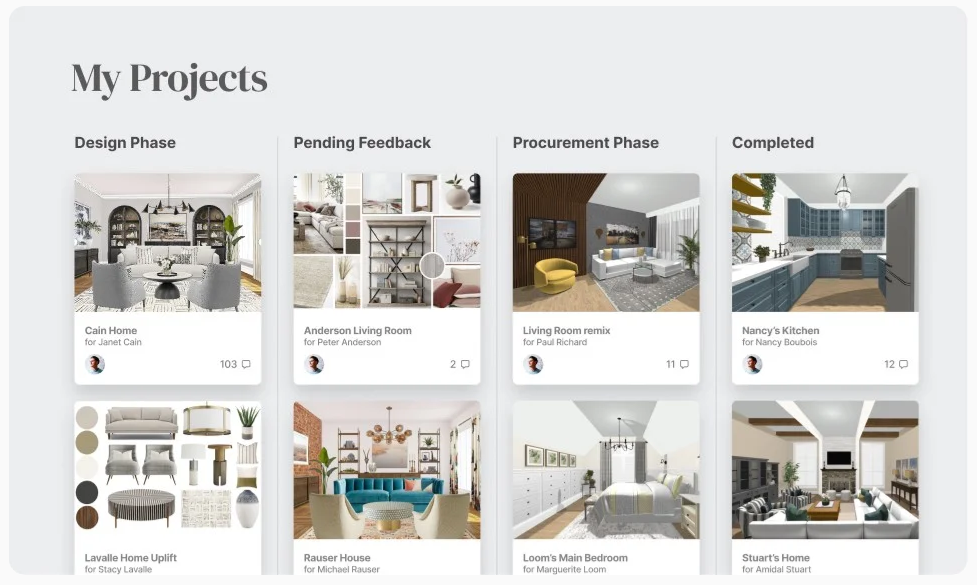
DesignFiles is the top-rated interior design platform, and it’s the one I’d recommend to most designers without hesitation. It brings moodboard tools, floor planning, 3D renderings, and every project management feature you need into one place, so you’re never bouncing between tabs trying to piece together a complete picture of where a project stands.
Customer reviews:
4.6 stars out of 535 reviews on Capterra; 4.5 stars out of 3 reviews on G2
Top features:
- Moodboard
- Floor planner
- 3D renderings
- Browser extension product clipper
- Customizable design questionnaires
- Client portal
- Client and team communication
- Quotes
- Invoices and retainers
- Online credit card and ACH payments
- RFQs and purchase orders
- Product tracker
- Spec and tear sheets
- Branded PDF presentations
- Task management and project calendar
- Project dashboard
- Follow-up cards for important reminders
- Design board at-a-glance updates
- Time tracker
- Client / vendor contact list
- Activity log
- Digital contracts
- QuickBooks integration
- Financial reports
Where it earns its keep mid-project is the task management and project calendar pairing. Templates load your phases once and reuse them. Anything you assign syncs onto the calendar, so your to-do list and your dates never drift apart. Contractors and junior designers show up in the same view through team collaboration, which matters once you stop being the only person touching a project.
More than 6,000 designers now run their businesses on DesignFiles, with 682K projects managed and $1.9B invoiced to date.
Pros:
What I love most about DesignFiles is how intuitive it feels from day one. It’s a fan favorite among solo designers and small firms, and that reputation is well-earned. The client portal is beautiful and branded, which matters more than people realize when you’re trying to position yourself as a high-end designer. And the payment processing fees are genuinely the lowest I’ve seen in this industry. ACH transfers are just 0.8%, capped at $10 per transaction, which adds up to real savings if you’re processing multiple large invoices each month.
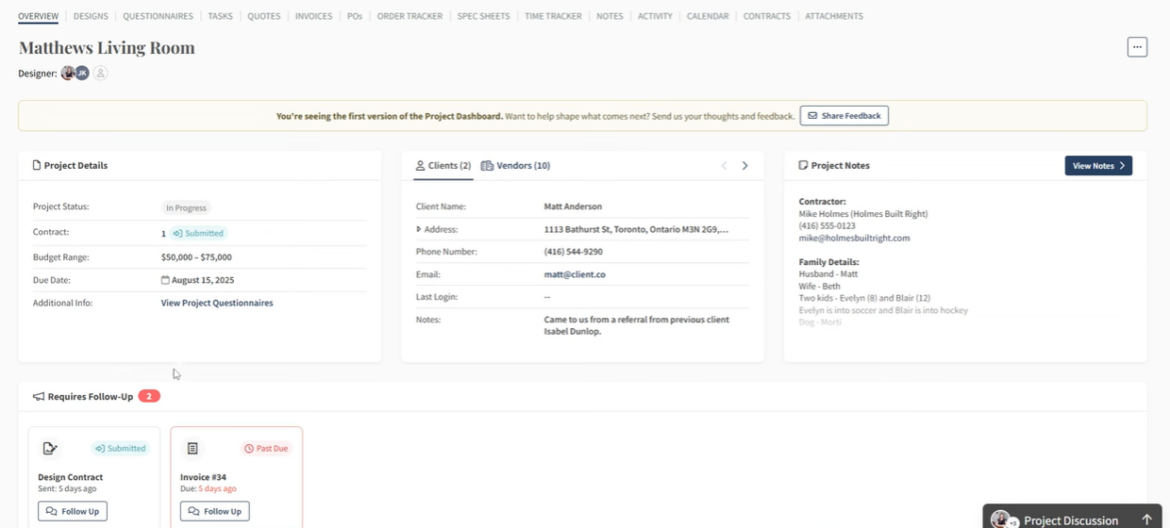
The Project Dashboard is one of those features any designer will love. Follow-Up Cards surface time-sensitive items like unpaid invoices or outstanding quotes right at the top, so nothing slips. Design Board Updates give you a quick visual of new client activity on shared moodboards, floor plans, and renderings without having to click into every single project. And the Project Financials panel gives you a snapshot of invoiced, paid, and outstanding amounts at a glance, with the option to hide it from team members who don’t need access.
On the design side, DesignFiles has made some of its biggest upgrades recently. The AI rendering tool now produces noticeably more photorealistic results, which has been a game-changer for client presentations. The moodboard editor has been significantly overhauled with more editing capabilities, and the 3D floor planner has received major improvements too. If you’ve been using DesignFiles for a while and haven’t revisited these tools lately, it’s worth taking another look because they’ve come a long way.
Cons:
DesignFiles doesn’t offer 3D virtual walkthroughs. If that’s something your clients expect, I’d recommend pairing it with Coohom, which is affordable and integrates smoothly as a workaround.
Biggest complaint from other users, according to reviews: The most consistent con across Capterra reviews is that the 3D modeling library is smaller than some designers would like, and scaling and proportions in the moodboard editor can occasionally feel imprecise. A handful of reviewers also noted that clients lose access to their project files if you pause your account, which is worth knowing before you step away during a slow season.
Pricing:
| Free | For up to 1 project |
| e-Design | $49 per month, plus $25 per month for each additional team member |
| Full Service | $69 per month, plus $25 per month for each additional team member |
| Enterprise | Custom pricing |
Searching for the Best Design Project Management Software?
“Loving This Product!”
“I was using a different project management software prior to this and it was so heavy and overwhelming. Everything required so many steps and was so technical. I love that I could just jump right into DesignFiles and easily begin projects. It took basically no time at all to figure out. It’s intuitive and simple.”
Stephanie S


Over 9,600 Designers Rely on DesignFiles Daily
2. Studio Designer — Best for large firms that need built-in accounting and financial reporting
Studio Designer is a project management platform built specifically for larger interior design firms that need serious accounting muscle built in. It goes well beyond standard invoicing, offering a full general ledger, accounts receivable, accounts payable, and detailed financial reporting. There’s also a notable development worth knowing about: Studio Designer acquired Mydoma in 2024, making it the largest business management software platform for residential designers, supporting nearly 20,000 designers across the US and Canada. The two platforms are currently operating separately, but it signals where the company is heading.
Customer reviews:
3.0 stars out of 2 reviews on Capterra; Not rated on G2
Top features:
- Purchase orders
- Proposals, invoices, and quotes
- Accounting system
- Client portal
- Payment processing (ACH and credit card)
- Custom reports
- Financial statements
Pros:
As one of the only project management softwares that includes built-in accounting software (Design Manager is the other), Studio closes the gap between project management and accounting. It offers all accounts receivable, accounts payable, and quick calculations for overhead, cash flow, and tax payments.
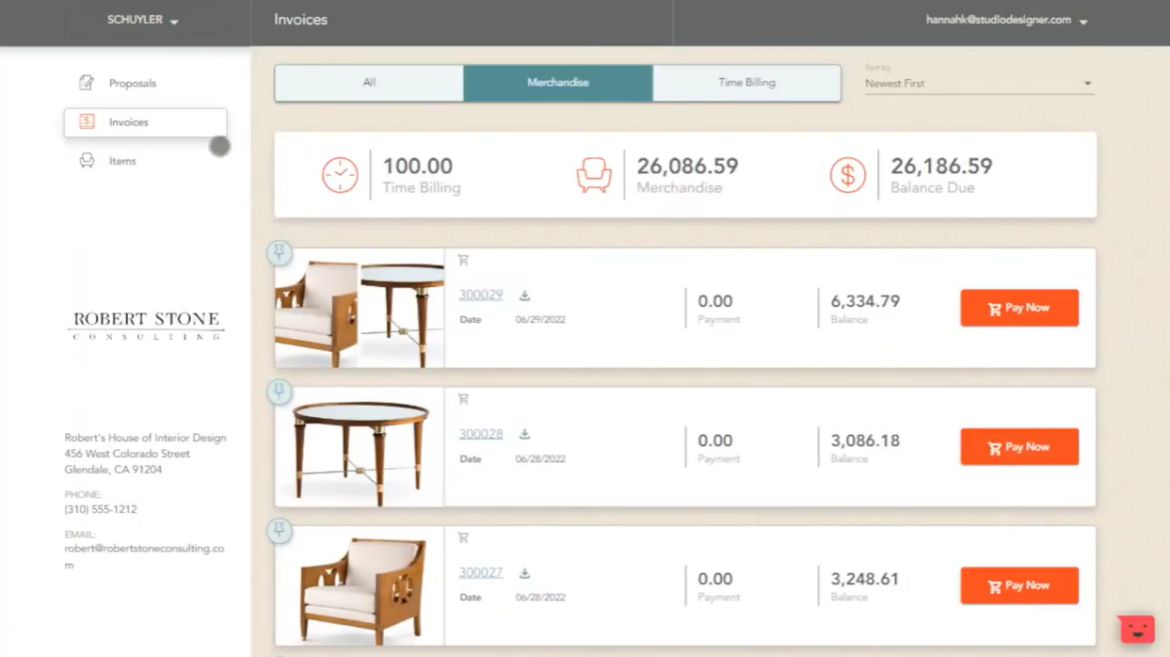
When I gave Studio Designer a try for myself, what really stood out was the attractive client portal. It lets you see all the important details in one place, including time billing, merchandise, invoices, and product items. Here’s an example dashboard that shows how easy it is to keep tabs on projects:
Cons:
Studio Designer is not a tool you can just open and figure out. The learning curve is steep, and if you don’t input information into the system correctly from the start, the detailed reporting that makes it worth the investment simply won’t work the way it should.
I also think it’s worth flagging something I noticed in recent Capterra reviews. Several users have raised concerns about reliability and customer support since the acquisition, with some noting that live support is no longer available. That’s not a dealbreaker for every firm, but it’s worth factoring in if responsive support is important to how your team operates. If you’re a solo designer or a small firm, this platform will likely feel like more than you need.
Biggest complaint from other users, according to reviews: Studio Designer has very few reviews on Capterra and none on G2, which makes it harder to draw broad conclusions, but the reviews that do exist point to two recurring themes: the platform is complicated to set up correctly, and customer support has become harder to reach since the acquisition. One Capterra reviewer specifically flagged that the software became less reliable after the ownership change and that live support is no longer available, which is a significant concern for a platform this complex.
Pricing:
| Essentials | $72 per user per month |
| Enterprise | $84 per user per month |
| Premier | $109 per user per month |
If you’re weighing Studio Designer against the other accounting-heavy option, our Studio Designer vs Design Manager comparison covers which suits which kind of firm.
Searching for the Best Design Project Management Software?
“Loving This Product!”
“I was using a different project management software prior to this and it was so heavy and overwhelming. Everything required so many steps and was so technical. I love that I could just jump right into DesignFiles and easily begin projects. It took basically no time at all to figure out. It’s intuitive and simple.”
Over 9,600 Designers Rely on DesignFiles Daily
3. Houzz Pro — Best for solo designers who need lead generation as much as project management
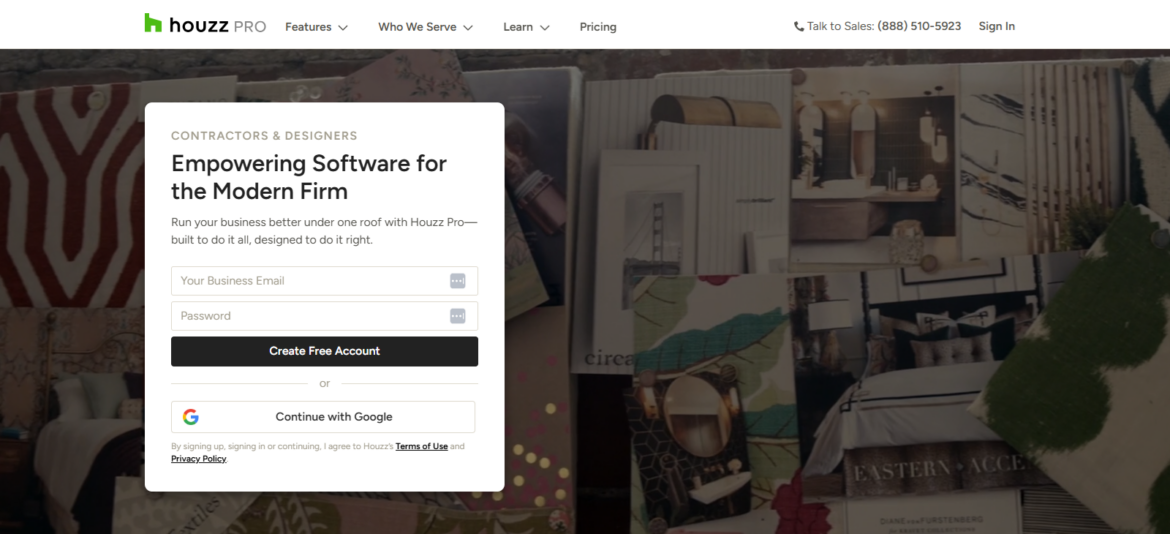
Houzz Pro is the platform designers ask me about most, and I can understand why opinions are so divided.
It combines project management, CRM, invoicing, selections, scheduling, and design tools in one platform. However, it was originally built to serve both construction and design professionals. I noticed that broader focus throughout my testing. The business tools often feel more developed than the interior design tools.
Customer reviews:
4.1 stars out of 59 reviews on G2
Top features:
- CRM and email marketing
- Estimates and proposals
- 3D floor plans
- Selections and client dashboard
- Houzz Pro Clipper
- Invoicing and payments
- Time tracking
- Schedule
- QuickBooks integration
Pros:
The biggest advantage I found was how much Houzz Pro puts in one place. I could manage client information, build proposals, send invoices, organize selections, track time, and communicate without piecing together several programs.
The client dashboard was one of the strongest parts of my test. Clients can review selections and approve or decline individual items directly. That creates a much cleaner approval process than relying on long email threads. The Clipper also makes it easy to add online products to selection boards while keeping the original product links attached.
I also liked how polished the estimates and invoices looked. Several reviewers said Houzz Pro helped their companies appear more professional, and that matched my experience. The client-facing documents and dashboards have a clean presentation.
The updated time-tracking tools are useful for designers who bill hourly. I could record time and connect it with the invoicing workflow instead of maintaining a separate log.
The AI chat box was helpful while I explored the platform. It answered basic navigation questions and directed me to settings without forcing me to search through every menu.
Cons:
Houzz Pro sometimes felt slow when I moved between pages. The delay was small each time, but it became more noticeable as I worked through a complete project.
I also found the 3D floor planner limiting for detailed interior design work. Adjusting floor plans could feel tedious, and the available customization wasn’t strong enough for projects with custom cabinetry, millwork, or unusual architectural details.
Some measurement controls also felt less precise than I wanted. For example, the placement logic can make it harder to set exact heights for items such as sconces and vanities. Creating certain interior wall and ceiling conditions is also restrictive.
There are a lot of features, which makes the initial setup more demanding than the interface first suggests. I would have benefited from a guided setup specifically for an interior design workflow. Without that, it is easy to configure the platform around generic project management rather than the way a design studio actually works.
I also wouldn’t choose Houzz Pro solely for its lead-generation features. Recent reviewers reported that leads may be shared with several professionals in the same category. I would treat the directory as a possible bonus rather than the main reason to subscribe.
Biggest complaint from other users:
The most consistent concern is the design and 3D functionality. Even reviewers who like the invoicing, CRM, and project management tools want more control over cabinetry, floor plans, measurements, and architectural details. My testing led me to the same conclusion.
Houzz Pro works best when you want strong business management and only need moderately detailed design tools. For custom millwork, advanced elevations, or highly precise modeling, you may still need a separate design platform.
Our full Houzz Pro versus Studio Designer comparison explores how it compares with a more design-focused system. Meanwhile, our guide to Houzz Pro alternatives breaks down what each platform costs at your real team size.
Pricing:
| Pro | $249 per year |
|---|---|
| Custom | Contact Houzz Pro |
| Enterprise | Contact Houzz Pro |
4. Programa — Best for studios that live inside FF&E schedules and procurement
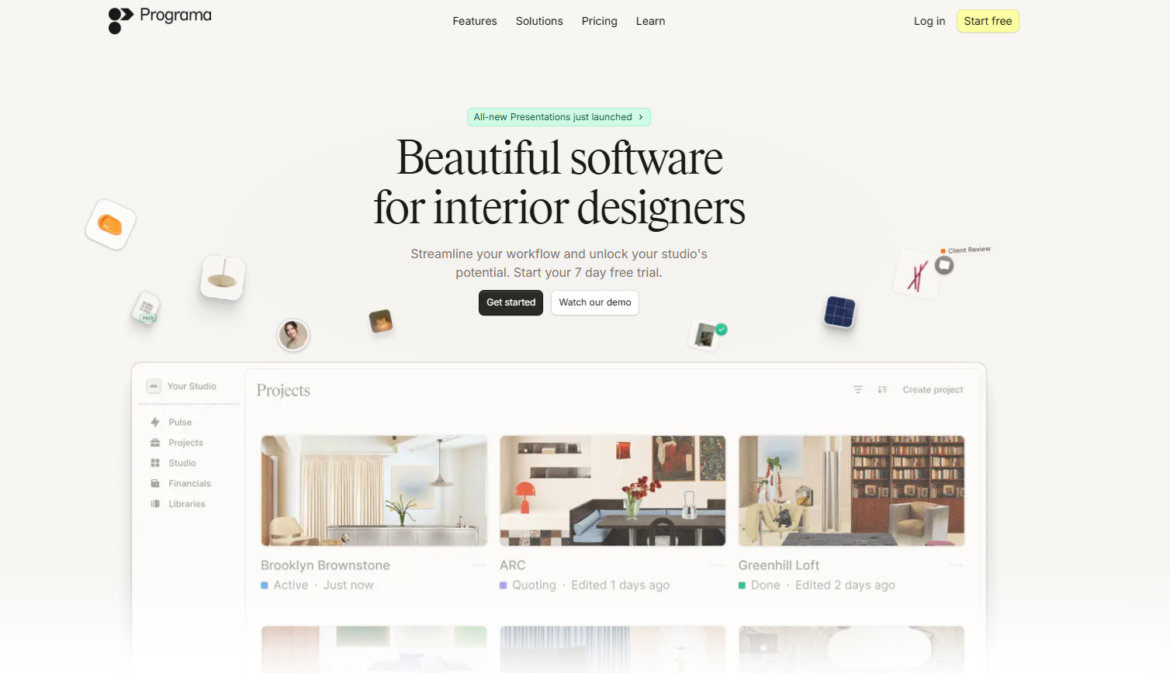
Programa stood out to me as a focused platform for studios that spend most of their time sourcing, specifying, and ordering products.
The clean interface made a strong first impression. It feels more modern and visually considered than many operations-heavy platforms. The schedule, product library, web clipper, and procurement hub form the core of the experience.
Customer reviews:
4.8 stars out of 11 reviews on G2
Top features:
- FF&E and finishes schedules
- Product library and trade portal
- Web clipper
- Client dashboard and approvals
- Presentations
- Invoicing and payments
- Time tracking
- Procurement and order tracking
- Task management
Pros:
Programa was easy to start using. I didn’t need much time to understand how projects, schedules, products, and procurement fit together.
The schedule was the strongest feature in my test. I could organize furniture, finishes, fabrics, and other specifications in a structured format that felt appropriate for interior design. This is an actual specification schedule, not simply a calendar or Gantt chart.
I also liked being able to archive an item instead of deleting it. That is a small feature with real practical value. Design selections change constantly, and removing an item completely can erase information you may need later.
The web clipper saved time while sourcing. I could bring a product into the system from its URL and add it to the relevant schedule without rebuilding every field from scratch.
Programa also connects design decisions with procurement more clearly than most generic project tools. I could follow an item from its specification through approval and ordering without maintaining a separate spreadsheet.
The client-facing approval workflow was straightforward. It gives clients a clear place to review selections and keeps decisions connected to the project.
Support also receives consistent praise in recent reviews. Reviewers described the team as quick and useful, which is important for a platform that may replace several existing systems.
Cons:
The financial reporting was the biggest limitation I noticed. Programa can show what is being specified and ordered, but it gives you less insight into what the project is actually earning.
The budgeting workflow may also feel backwards for firms that start with a fixed client budget. The budget grows as products are added to the schedule. I would rather enter the client’s full budget first and measure every selection against it.
Contact and vendor management need more depth. Larger firms may struggle without a dedicated place to maintain vendor information, supplier terms, and trade discounts. I would also like saved discounts to populate automatically when products are added to procurement documents.
Some supplier information still requires repetitive entry. That reduces part of the time savings created by the clipper and product library.
I also missed the ability to place hyperlinks inside presentations, meeting notes, and tasks. Links are part of almost every sourcing and collaboration workflow, so this limitation became frustrating quickly.
Schedules occasionally lagged while I updated them. It wasn’t constant, but it interrupted the otherwise smooth experience.
Programa does not include a floor planner, rendering system, or other substantial 3D tools. I would need to pair it with another platform for visual design work.
Biggest complaint from other users:
The strongest pattern in the reviews is that Programa handles specifications and procurement better than financial analysis. The review pool is currently small, but that observation also matched what I found during testing.
Programa is a strong option for designers who already have a rendering tool they love and want a better way to manage FF&E schedules, approvals, and procurement. It is less suitable for firms that want advanced profitability reporting or every visual and operational tool under one login.
Our full pros and cons of Programa breakdown goes deeper.
Pricing:
| Professional (monthly) | $59 per user per month |
|---|---|
| Professional (annual) | $47.20 per user per month for the first 3 users |
| Enterprise | Contact Programa |
5. Mydoma Studio — Best for designers who want flexible, client-focused project management
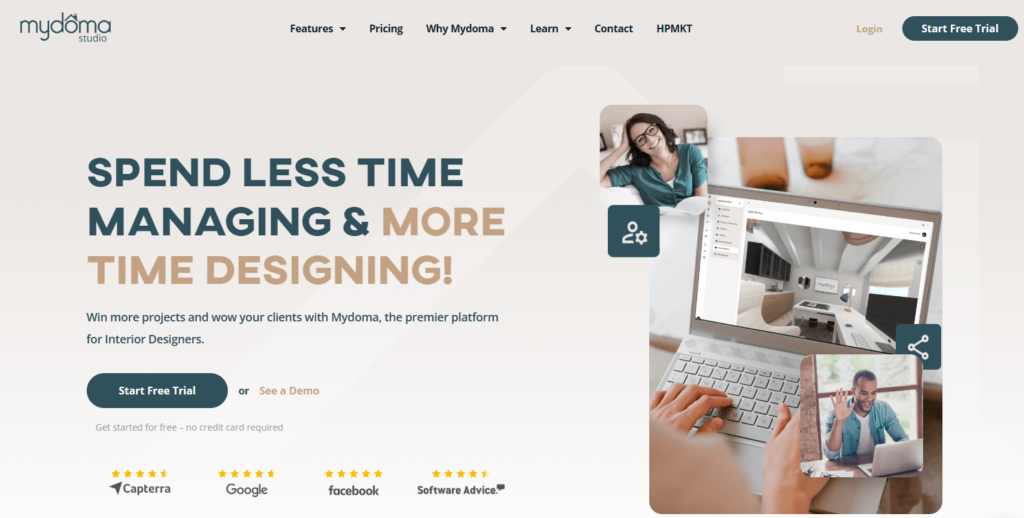
Mydoma Studio is a cloud-based project management platform built specifically for interior designers, covering everything from client onboarding and design presentations to invoicing and task tracking. One thing to know going in: Mydoma was acquired by Studio Designer in 2024. The platforms are currently operating separately and Mydoma continues to release updates on its own roadmap, but it’s context worth having if long-term product direction factors into your decisions.
Customer reviews:
4.2 stars out of 79 reviews on Capterra, 4.0 stars out of 1 review on G2
Top features:
- 3D floor plans
- Moodboard software
- Product clipper extension
- Client portal
- Client feedback
- Task management
- Time tracker
- Interior design packages
- Quotes and invoices
Pros:
Mydoma is genuinely one of the more flexible platforms I’ve tested. What stood out immediately was the project creation experience. You can add a cover image, client details, budget, and project description, and then toggle individual features on or off depending on the scope of work. A quick paint consultation doesn’t need task management and proposals cluttering the view. A full-service renovation can have everything activated. I found that level of control surprisingly useful for keeping things clean across very different project types.
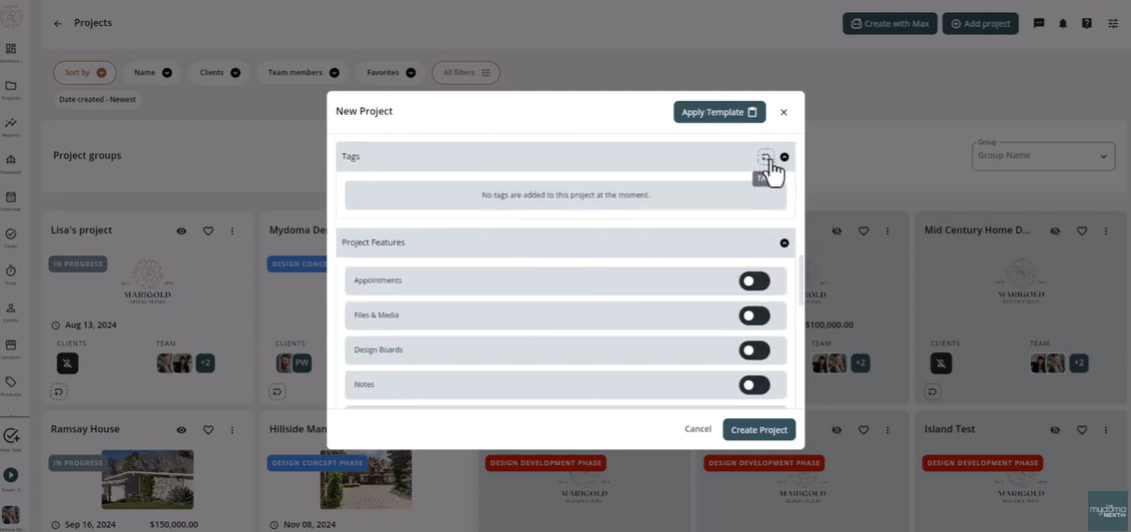
Project templates are another strong point. Instead of building out the same setup from scratch each month, I could apply a saved template with the right features and settings already in place, which made starting new projects noticeably faster. Mydoma also launched a Presentation Mode for client-facing work, and their recent releases focused on improving financial accuracy and making workflows more reliable across invoices and task management.
Cons:
The visualizer is an additional $50 per month, which adds up. Without it, your rendering and walkthrough capabilities are limited. I’d also pay close attention to the project history limitations on your chosen plan. Depending on what you select, older projects can be removed from your account after a certain time frame, which is worth understanding before you commit.
Biggest complaint from other users, according to reviews: “Clunky” is the single word that appears most often across Mydoma’s Capterra and G2 reviews, cited by multiple independent users over several years. Reviewers describe navigation as not always intuitive, tasks taking more clicks than expected, and some features feeling underdeveloped for larger firms. The good news is that Mydoma has consistently acknowledged this feedback and has been actively working to address it, but it’s worth testing the current version before you decide.
Pricing:
| Core plan | $64 per user per month |
| Mydoma visualizer (enhanced renderings & walkthroughs) | $50 per account |
6. Design Manager — Best for large firms that prioritize accounting over design tools
Design Manager is built for firms that treat accounting as seriously as they treat design. Like Studio Designer, it leans heavily into financial management over visual design tools, so you’d need to pair it with something like Coohom or SketchUp for the design side of your projects.
Customer reviews:
Not rated on Capterra; 2.8 stars out of 2 reviews on G2
Top features:
- Specifications/FF&E
- Project workflow tracker
- Purchasing and order tracking
- Client portal
- Accounting
- Delivery and inventory reports
- Payment processing
- Showroom management
- Product clipper
Pros:
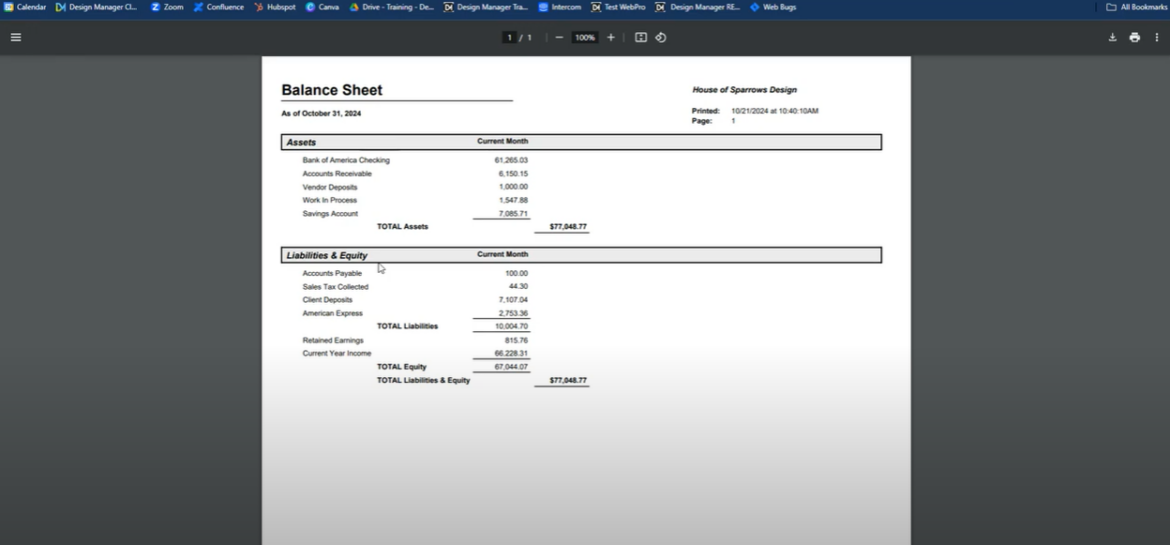
The accounting capabilities in Design Manager are genuinely comprehensive. When I tested the reporting features, I was impressed by how professional and detailed they are. The Balance Sheet gives you a clean snapshot of assets, liabilities, and equity by month, broken down into categories like accounts receivable, client deposits, and retained earnings.
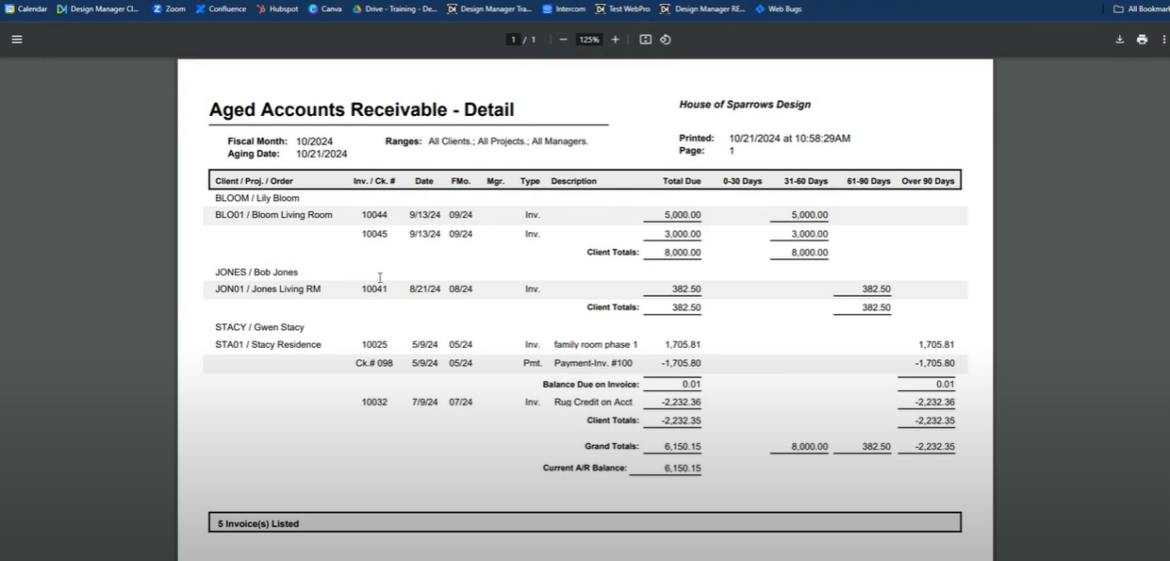
The Aged Accounts Receivable report was particularly useful for flagging which clients had outstanding balances and how long those had been sitting, which is exactly the kind of visibility that helps you follow up before things get awkward.
One recent addition worth noting is the credit card reconciliation feature, which lets you match charges from your credit card statements directly with expenses recorded in Design Manager. For firms tracking multiple cards across a team, this is a meaningful upgrade that previously required manual cross-referencing. For larger firms that need that level of financial precision, Design Manager delivers it better than almost anything else in this category.
Cons:
Because it doesn’t include design tools and charges per user, Design Manager is really only a strong fit for larger firms where accountants and operations managers handle the billing side. If you’re a solo designer or a small team that wants design and financial tools in one place, this one isn’t built for you.
Biggest complaint from other users, according to reviews: With only two reviews on G2 and none on Capterra, the review pool is too thin to identify a clear pattern. What does come up is a steep learning curve and the absence of design tools, which means you’re paying $79/user/month for a platform that handles financial management only, and needs to be paired with separate software for everything else.
Pricing:
| Design Manager (one plan) | $79 per user per month |
7. Gather — Best for mid-size to large firms managing complex FF&E specifications
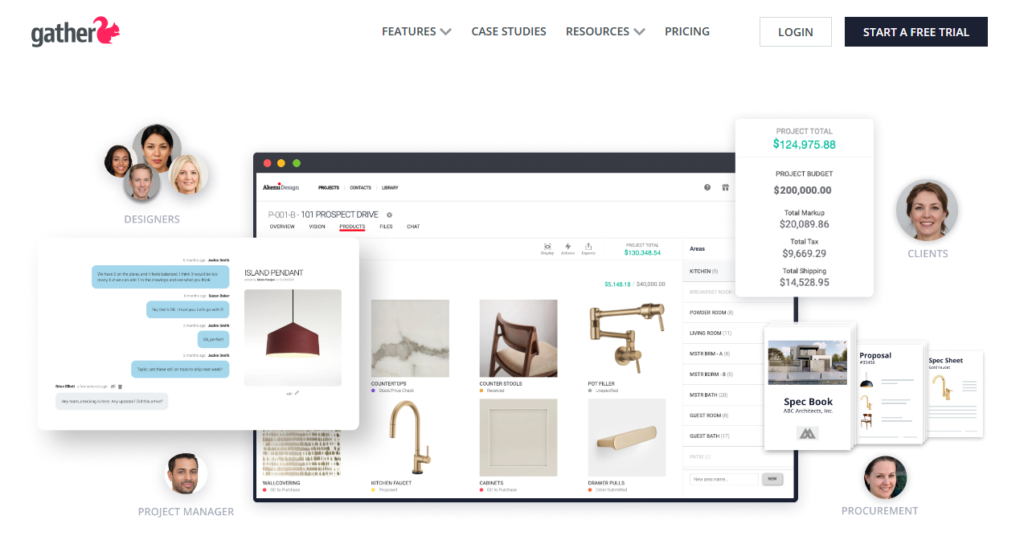
Gather is a specification-focused platform built for medium to large interior design and architecture teams that manage complex, detail-heavy projects. If your work involves serious FF&E documentation and you need your whole team working from the same source of truth, this is one of the strongest tools in that category.
Customer reviews:
4.9 stars out of 10 reviews on Capterra; not rated on G2
Top features:
- Interior design specification management
- Browser clipper extension for sourcing
- Project management
- Spec sheets
- Business asset management library
- Supplier and client management system
Pros:
Gather includes a contact management feature that works well for storing clients, vendors, stakeholders, and contractors. You can assign the right contacts to the right jobs to keep track of who’s working on what. This feature can be really helpful for larger firms. Gather also offers a spreadsheet view to help you narrow down into specification details and product orders.
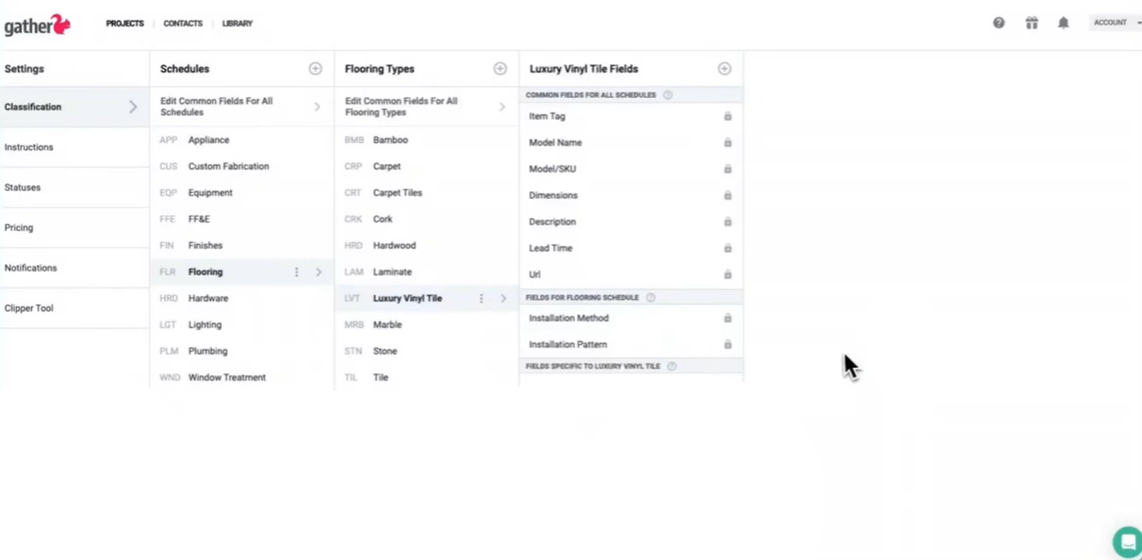
When I tested Gather myself, one of the most impressive features was the custom spec templates. Using the classification system, I was able to create schedules, define product types, and add specific fields within each type. For example, when I set up a category for luxury vinyl tile, I could include detailed fields like dimensions, model/SKU, lead time, installation method, and even installation pattern. It felt like building a perfectly tailored checklist that ensures nothing gets missed.
What I loved most is that once these templates are in place, every time you clip a product into Gather, the system prompts you to fill in all the relevant fields. This keeps specs consistent and complete across the whole team, and you can also attach vendor documents or images for reference. It really streamlines the workflow and gives peace of mind knowing that all critical details are captured.
Cons:
Gather doesn’t have 3D floor plans or visualization tools, so you’ll need a separate design platform alongside it. The bigger limitation I’d flag, though, is one that comes up repeatedly in Capterra reviews: the invoicing and financial tools feel noticeably underdeveloped compared to the spec features Gather does exceptionally well. If billing and client payments are a meaningful part of your workflow, you’ll likely find yourself needing to supplement with another tool. At $99 to $199 per month, that’s worth factoring into your total software budget.
Biggest complaint from other users, according to reviews: Gather’s Capterra reviews are overwhelmingly positive, which makes it harder to pinpoint a recurring complaint. The most common theme is simply that the invoicing and billing tools don’t match the quality of the spec and sourcing features, meaning some designers need to supplement with a separate tool for client payments. At $99 to $199 per month, that additional cost adds up.
Pricing:
| Spec Lite | $99 per month for up to 2 team members, $39 per additional user |
| Spec Pro | $199 per month for up to 2 team members, $39 per additional user |
| Spec Premium | Custom pricing |
8. Dubsado — Best for designers who want powerful client automation and CRM tools
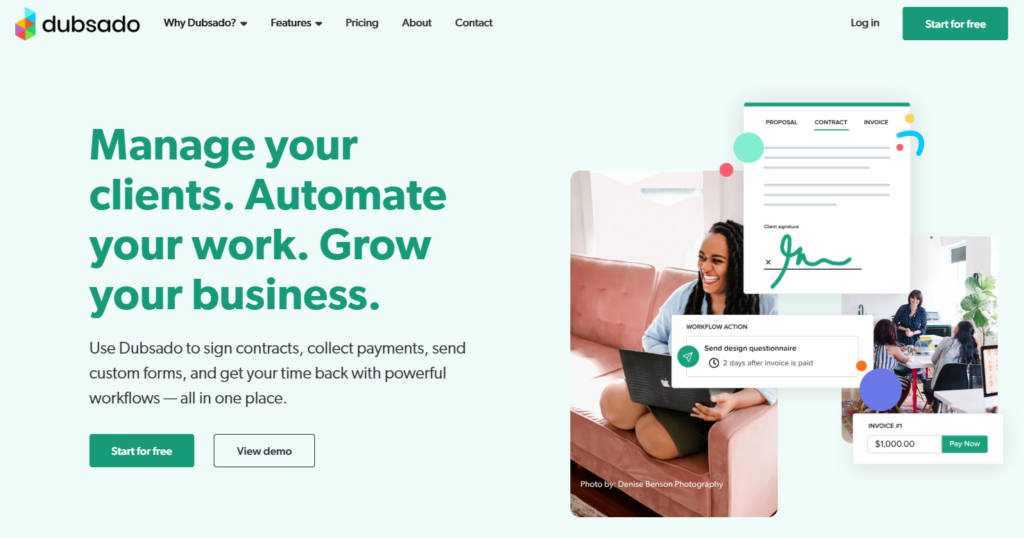
Dubsado is a client and project management platform built for creative entrepreneurs across industries, including photographers, marketers, and designers. Before diving into what it does well, there’s something important to flag upfront: Dubsado launched a complete ground-up rebuild called Dubsado 3.0 in November 2025. This isn’t a cosmetic update.
The entire platform has been restructured, workflows have been renamed “Flows” with a new visual node-based builder, a Kanban board has been added, and a global time tracker is now available on the Premier plan. Dubsado 2.0 is being retired in 2026. If you’re evaluating Dubsado right now, you’re evaluating 3.0, not the version most older reviews describe.
Customer reviews:
4.3 stars out of 50 reviews on Capterra; 4.2 stars out of 71 reviews on G2
Top features:
- Forms and templates
- Lead follow-up automation
- Invoices
- Payment processing
- Appointment booking
- Client portals
- Financial reports
Pros:
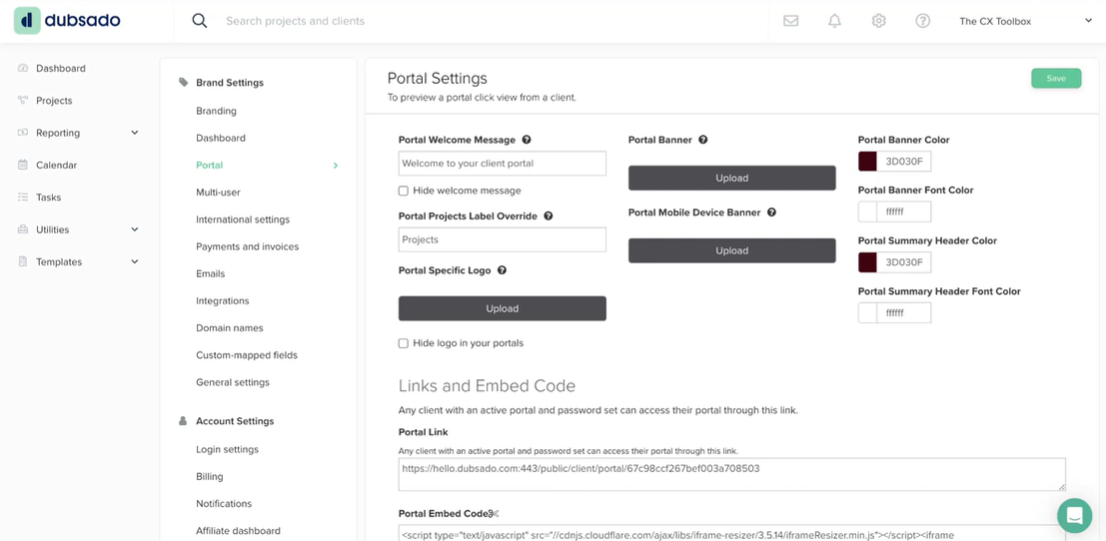
What I find most compelling about Dubsado is the automation. The Flows builder lets you set up sequences that handle lead follow-up, contract sending, invoice scheduling, and appointment booking without you having to manually trigger each step. For designers who get a steady stream of inquiries, this kind of automation can save a significant amount of time on the front end of the client relationship. The client portal customization is also genuinely impressive. You can adjust the welcome message, banner image, logo, and brand colors, which gives it a more polished, branded feel than most platforms in this price range.
Cons:
The tradeoff is that Dubsado isn’t built for interior design specifically, so you won’t find product libraries, sourcing tools, moodboards, or floor plans anywhere in the platform. You’d need to run it alongside something like DesignFiles for the design side of your business. The 3.0 rebuild is also worth approaching with realistic expectations. Several reviewers note that setup is complex enough that people have built careers specializing in Dubsado onboarding, and early 3.0 users have flagged bugs while the platform continues to stabilize. If you’re an existing user, be aware that transitioning from 2.0 means rebuilding your automations from scratch. The new time tracker is also limited to the Premier plan and can’t be edited once entries are applied to an invoice, which is a frustrating constraint for hourly billing.
Biggest complaint from other users, according to reviews: The setup process is the most-cited frustration across Capterra, G2, and independent reviews, consistently described as taking 15 to 25 hours to configure properly before the automation becomes useful. Capterra rates Dubsado 3.6 out of 5 specifically for ease of use, which is notably lower than its overall score. Some users spend their entire free trial period just configuring their first workflow. If you don’t have the time or patience for a significant upfront investment, this one will feel like more trouble than it’s worth.
Pricing:
| Free | For up to 3 clients |
| Starter | $20 per month for up to 3 team members |
| Premier | $40 per month for up to 3 team members |
9. Spoak — Best for homeowners and beginner designers just getting started
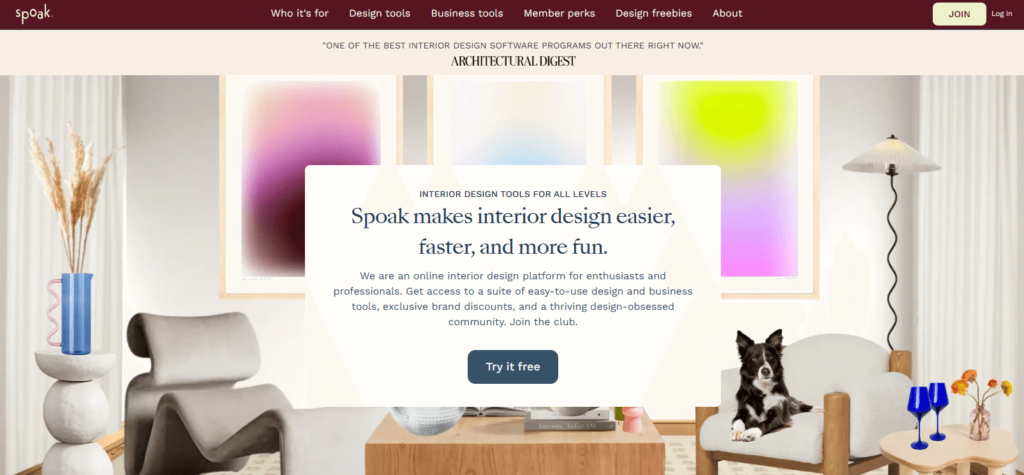
Spoak is designed for homeowners and designers who are just getting started, and it shows in the best way. It’s light, visual, and genuinely fun to use, which isn’t something you can say about most project management software.
Customer reviews:
Not rated on Capterra, Not rated on G2
Top features:
- Design inspo discovery feed
- 3D floor plans
- Moodboards
- Project overview dashboard
- Invoices
- Portfolio gallery
- Inspiration feed
- Client feedback collection
Pros:
Getting up and running with Spoak is fast, and I appreciated that it doesn’t assume any prior software experience. If you like Pinterest, you’ll feel right at home here. The searchable inspiration feed lets you browse products and full design concepts when you’re feeling stuck, which is a thoughtful touch for designers who are still building their sourcing instincts.
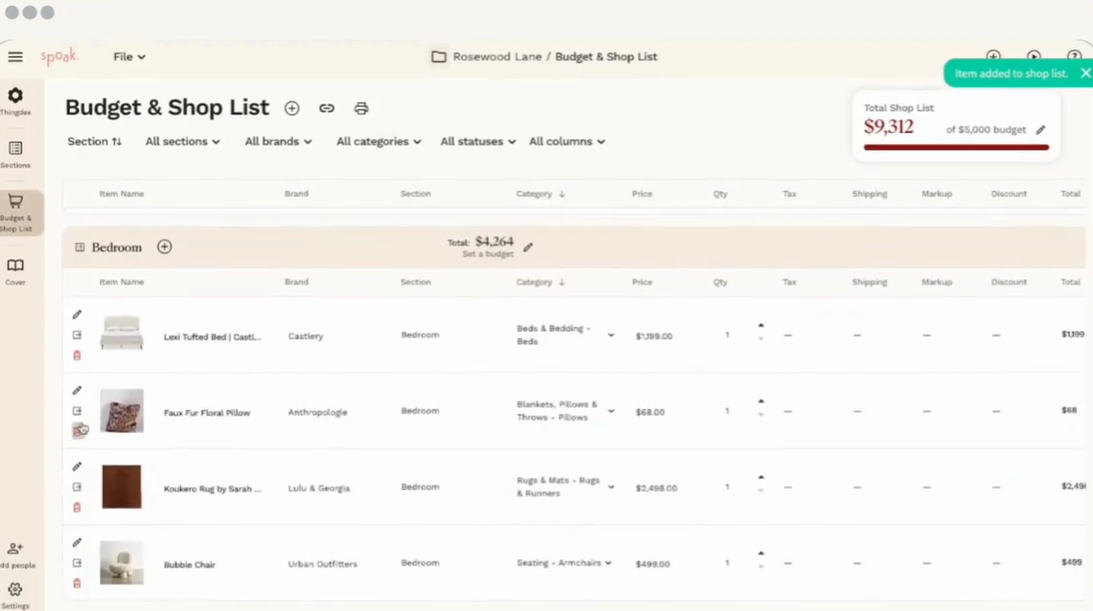
The Budget and Shop List feature was the one that impressed me most during testing. It updates in real time as you add items, showing a running tally broken down by both room category and overall project. When I added a handful of bedroom items to a test project, the totals updated instantly and the layout stayed clear and easy to read. It feels more like an interactive catalog than a spreadsheet, which makes sharing budget updates with clients genuinely painless.
Cons:
Spoak’s simplicity is also its limitation. There’s no time tracker, no task manager, and no browser-based product clipper, which are tools most working designers rely on daily. I also noticed that unlimited client projects require a custom enterprise account, whereas most other platforms on this list include unlimited projects on standard paid plans. If you’re running an active full-service design business, you’ll likely outgrow Spoak quickly.
Biggest complaint from other users: Spoak currently has no reviews on Capterra or G2, so there isn’t enough verified user feedback to draw meaningful conclusions here. If you’re seriously evaluating it, I’d recommend finding community feedback in interior design Facebook groups before committing.
Pricing:
| Play | $14.99 |
| Power | $49.99 |
| Enterprise | Custom |
What your software has to do at each phase of a project
Those six workstreams don’t all matter at once, and that’s the part a feature grid can never show you. It’s also why a platform can look complete in a demo and get abandoned by month three.
So let’s walk a project instead. Four stages, and the capability that decides each one. If you want the process itself rather than the tooling, our interior design process checklist covers it phase by phase.
In workshops, the breakdowns designers describe almost never happen mid-phase. They happen at the handoffs.
Before the project starts: intake, contracts, and the first invoice
Design questionnaires, digital contracts with e-signatures, proposals, retainer invoicing, and one contact list holding clients and vendors together.
Ask whether your platform can take a project from signed contract to collected deposit without you opening anything else. That’s where tool sprawl starts, and it’s why so many designers pay for a CRM they only half use.
Dubsado handles this end beautifully and the design end not at all. That’s the trade. If contracts are the thing you rebuild from scratch each time, our guide on how to write a design contract will save you hours.

While you’re designing: boards, plans, and approvals
Moodboards, 2D and 3D floor plans, a browser clipper, a product library, and a client portal. Feedback should land on individual products, not in a reply-all thread.
Ask where approval happens. If it happens in email, you’ll eventually have the conversation that starts with “I thought we agreed on the other one.” Programa, Gather, and Design Manager expect you to bring your own design software. DesignFiles, Mydoma, and Spoak keep design and approval together.
The other half of this phase is telling clients what’s happening before they think to ask.
“It is not the client’s job to ask us what is happening. It is our job to tell them. We send a project update every week, minimum, almost to the point of being obnoxious.” — Kimberley Seldon, Founder, Business of Design
While the project runs: tasks, calendar, and your team
Task management, reusable templates, a project calendar, time tracking, and assignments your team can see.
Ask whether tasks and dates live together. A task list that never surfaces on a calendar is one you’ll stop opening by week three. Template quality matters more here than the task features themselves. If you run a six-phase process, you want to load it once and reuse it.
“When I review a template, I am looking for loopholes. We added a remeasure right after demo day, because once things are demoed, measurements change.” — Rasheeda Gray, Founder and Principal, Gray Space Interiors
That’s the whole argument for templates. Every project teaches you something, and a template is where you put it so the lesson sticks. Our guide to task management for interior designers goes deeper on building them.
Ordering, installing, and closing out
RFQs and purchase orders, spec and tear sheets, final invoicing, and payment processing. You also want an order tracker that keeps working after the PO goes out. This is the phase where the most platforms quietly stop being useful.
Be honest about the gaps. Gather is exceptional at specs and thin at billing. Spoak has no procurement at all. Studio Designer and Design Manager own this end completely.
Whatever you choose has to survive the substitution problem from earlier: one approved change rippling through six documents. If margins are what worry you most, interior design business expenses is the companion read.
How to tell whether a project actually made money
You opened this article because a project felt unprofitable. Let’s close that loop, because this is the capability every other comparison guide forgets to mention.
The three numbers a project report has to give you
Three numbers tell you whether a project worked.
Revenue by project, split between your service fees and your product markup. Hours logged against that project. And what’s been collected versus what’s still outstanding.
Almost every platform hands you that third one. It’s called accounts receivable, and it is genuinely useful. It also isn’t profitability, and plenty of designers treat the two as the same thing.
A project can be paid in full and still have lost you money.
That happens when the hours quietly outran the fee. Without time logged against the project, you’ll never see it, and you’ll price the next one exactly the same way. For the accounting side of this, our guide to bookkeeping for interior designers covers what your books should be showing you. For the product side, start with how to markup products.
Billable versus non billable, and why flat fee designers still need it
I know. You charge flat fee, so why on earth would you track hours.
Tracking time doesn’t change what you invoice. It changes what you quote next time.
The number worth watching is hours spent on a project type against the fee you charged for it. The gap between those two is exactly where your pricing gets fixed, and you can’t see a gap you aren’t measuring.
A designer I worked with tracked her hours for one quarter without changing a single price. Her mid range full service package was taking almost as long as her top tier, for around sixty percent of the fee. She restructured both packages the following quarter, and nothing about her process changed except what she charged.
What to test during a free trial
Four things, all doable in under an hour.
Run one real past project through the platform and see whether the financial view reconstructs what you actually earned. Check whether product markup shows separately from service revenue. Check whether you can export a report your bookkeeper will accept without reformatting it first. Then check whether tracked hours flow onto an invoice without you retyping anything.
Of the nine platforms above, DesignFiles, Studio Designer, and Design Manager handle all four. Programa and Gather will struggle on the first two. Dubsado and Spoak aren’t built for this at all.
How to choose the right platform for the size you are now
Stop asking which tool is best. Ask which one fits the business you’re actually running today.
Match the platform to the size you are now
Solo or two person. Per-user pricing hurts you least here, but you can’t afford two subscriptions. You need design tools and business tools under one login: moodboards, a floor planner, a product clipper, digital contracts with e-signatures, customizable questionnaires, quotes, and invoices. DesignFiles and Houzz Pro both fit. Spoak works if you’re brand new and mostly doing e-design.
Three to eight. The hours move to procurement and specs at this size. Prioritize spec sheets with dimensions and finishes, RFQs, purchase orders, and an order tracker your clients can see themselves. DesignFiles, Programa, and Gather all handle this well, though only one of the three also does your visuals.
Nine or more. Built-in accounting starts to earn its complexity. A general ledger, accounts payable and receivable, and firm-level financial reporting are worth the learning curve at this scale. Studio Designer and Design Manager are your two real options.
Then match it to whichever problem is loudest
Once size is settled, choose by pain.
Clients keep asking you where things are. Prioritize the client portal, design approvals, and a client-facing order tracker.
Ordering is what breaks. Prioritize procurement, purchase orders, and spec sheets. Gather and Programa are strong here.
You can’t tell what a project earned. Prioritize financial reporting, a time tracker, and a QuickBooks integration.
Presentations are eating your weekends. Prioritize moodboards, 3D floor plans, and branded PDF presentations. If you’re also rethinking what you charge, our guide to interior design pricing packages pairs neatly with this. For the wider operational picture, our business management guide goes broader.
Run one real project through it before you commit
Don’t evaluate software with fake data. Every platform looks fine with three test products in it.
Take a live project. Set it up properly. Time how long that takes you.
Designers abandon a tool in month two far more often than month one, and the reason is almost always that setup never actually got finished.
The designers who stick with a platform are the ones who moved one real project into it during the trial. The ones who moved nothing are back on spreadsheets by spring.
Frequently asked questions
DesignFiles offers the best project management software for interior designers because it includes essential tools for tracking client preferences, sourcing products, completing designs, and collecting client feedback. Key features include digital contracts, design questionnaires, a web-browser product clipper, moodboard software, 3D floor planner, task management, time tracking, invoices, and spec sheets.
When you use specialized software to manage your interior design projects, you can reduce complexity and complete projects faster. Rather than using separate software for client questionnaires, quotes, payments, product sourcing, purchase orders, etc., you can manage everything in one place. With all the details consolidated, you won’t waste time looking for information.
Some of the key features include design questionnaires, client portals, task management, quotes, invoices, retainer payments, RFQs, purchase orders, tear sheets, time trackers, vendor contact management, and digital contracts. You might also want to look for a platform with accounting features or an integration with QuickBooks.
Expect $35 to $109 per month to start. Flat-rate platforms like DesignFiles ($49) and Dubsado ($35) charge per account with a smaller add-on per team member. Per-user platforms like Studio Designer ($72), Design Manager ($79), and Programa ($59) scale up quickly once your team grows. Calculate the cost at your actual headcount, not at one seat.
Some can, and plenty cannot. Most platforms show you what’s been invoiced and what’s outstanding, which is accounts receivable rather than profit. True profitability needs revenue split between service fees and product markup, plus hours logged against the project. DesignFiles, Studio Designer, and Design Manager give you all three.
Only if the platform you choose doesn’t do both. Programa, Gather, Design Manager, and Dubsado all need a design tool alongside them, which means a second subscription. DesignFiles, Studio Designer, and Mydoma include moodboards, floor plans, and project management together. Solo designers usually feel the cost of two subscriptions hardest.
Plan for a weekend rather than an evening. Setup effort varies enormously, and Dubsado is the outlier, with users reporting 15 to 25 hours to configure automations properly. Most designer-focused platforms are faster, especially if you build your task templates first. Switch between projects wherever you can, or start fresh on your next new client, so nothing live gets disrupted.
Often, yes, and that’s usually the whole reason to switch. An all-in-one platform holds enquiries, contracts, tasks, client approvals, invoices, and purchase orders in the same account. Where it gets harder is prospecting automation, since dedicated CRMs still run lead nurture sequences better. Some designers keep a light CRM for cold leads and run everything from the signed contract onward in one place.
Ready to manage projects like a pro? Streamline your business with DesignFiles.
You know your process better than any software company does. The right platform simply stops making you rebuild it every time.
If you’re solo or running a small firm and want design and project management under one login, start with DesignFiles. If lead generation matters as much as project management, trial Houzz Pro. If FF&E and procurement are where your hours go, look at Programa or Gather. If your firm has someone whose actual job is the books, Studio Designer and Design Manager are built for exactly that.
Whichever way you go, choose against your own project phases rather than against a feature list. And once the admin load drops, you’ll have room to think about what to do with the time. A few designers I know put it straight into affiliate income. It’s one of the more painless ways to earn from products you already recommend.
Your first project on DesignFiles is free, no credit card required, so you can run a real job through it before committing to anything. Start your free trial.