
Need an interior design scope of work template you can use today? There’s a free Google Doc below, with no signup or email required. It covers your phases, deliverables, and revision rounds. It also lists what the project doesn’t include, and that list protects you most.
Say your client loves the living room plan and asks when the guest bath starts. You never quoted the guest bath, but she’s sure it came with the package. A written scope lets you point to the list of included rooms instead of arguing.
You can present it in DesignFiles alongside your mood boards, floor plans, and 3D renderings. That way, your client sees the design and its boundaries together.
The template comes first, followed by a step-by-step guide to filling it in.
Table of Contents
Free interior design scope of work template
Open the free interior design scope of work template (Google Doc)
To edit it in Google Docs, choose File > Make a copy. If you’d rather use Word, choose File > Download > Microsoft Word (.docx). You can also skip straight to making your own copy or downloading the Word version.
In workshops, I most often hear about a “quick” extra that eats a weekend. The designers who avoid that problem wrote down their exclusions before the project began.
That’s why the “Not included in this scope” section deserves your closest attention. Here’s everything the template covers:
- Project details: client, address, your business, scope version, and the contract it’s attached to.
- Project summary: one or two sentences on what the project needs to achieve.
- Service level: checkboxes for full service, e-design, or consultation only.
- Spaces: what’s included and what isn’t, side by side.
- Phases, deliverables, and dates: a table from Discovery through Project completion, with feedback deadlines.
- Revisions: rounds included per phase and the rate for extra rounds.
- Who handles what: responsibilities for you, your client, and the trades.
- Not included in this scope: a checklist of common exclusions, with room for yours.
- Change requests: how extra work gets proposed, priced, and approved in writing.
- Fees and payments, and sign-off: a contract reference and signature lines.
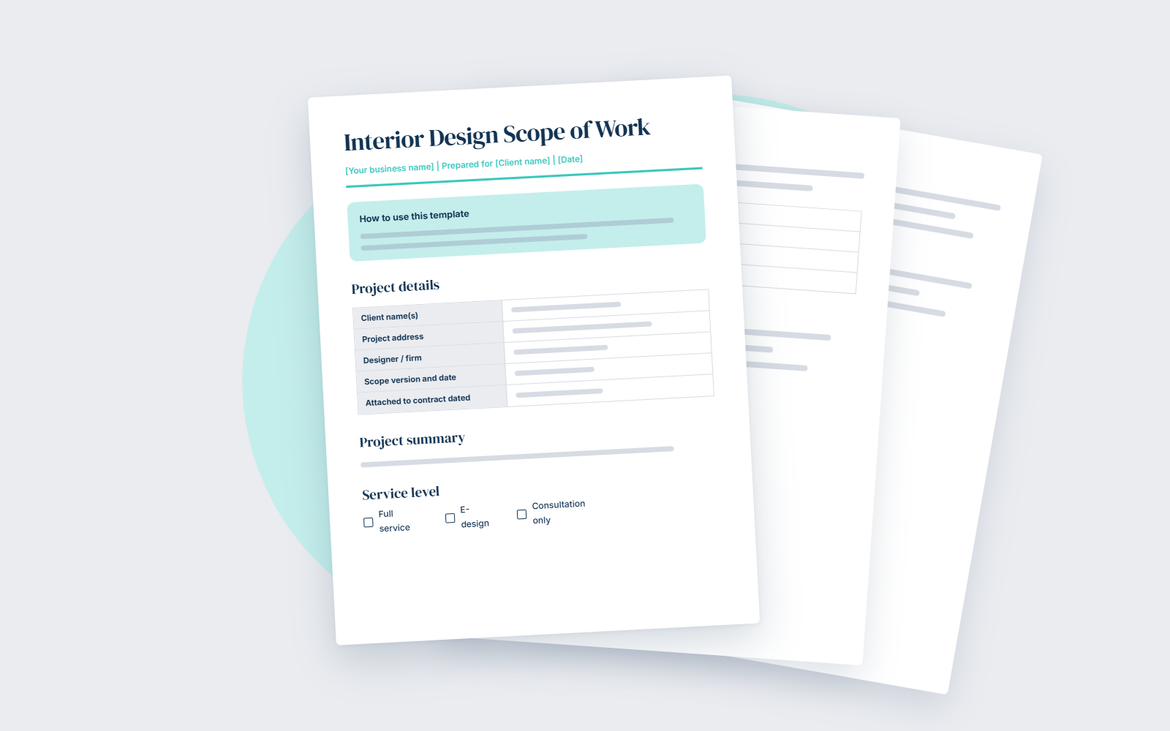
If a client asks for something off your list, follow the “Change requests” section. Send a short change proposal for the extra work and settle the price first.
Put your scope inside a signed contract
Every DesignFiles plan includes 5 contract templates you can customize. Two of them are the Full-Service Interior Design Agreement and the E-Design Service Agreement. The Full-Service Agreement already ends with its own scope of work section. Paste your finished scope into that section, or edit the one that’s there.
Save any template to My Templates, then adjust the payment terms and branding. When it’s ready, send it for e-signature through your client portal. Clients can sign on any device, and you can add more than one signer. You’ll see when a client views or signs, and can send reminders in one click.
A free 1:1 setup session can walk you through your first contract. See how DesignFiles contracts work, or join the 6,000+ designers already running projects in DesignFiles.
What is a scope of work in interior design?
An interior design scope of work is a detailed document that outlines the responsibilities, deliverables, and expectations for a design project. It serves as a roadmap, keeping everyone on the same page from concept to completion. A well-structured SOW helps designers avoid misunderstandings, manage timelines, and prevent scope creep, which can lead to extra costs and delays.
Why you need an interior design scope of work
Every successful design project starts with a clear plan. A good SOW sets the foundation. Here’s why it’s an essential part of any interior design project:
- Prevents miscommunication and disputes with clients: The SOW outlines exactly what will be done, so there are no surprises along the way. It keeps expectations aligned and minimizes back-and-forth conversations.
- Helps set clear deliverables, responsibilities, and timelines: It also keeps the project on track by breaking it down into phases. It clarifies who is responsible for what, making it easier to manage deadlines and stay organized.
- Provides legal protection by documenting agreements: Every project involves commitments. A written SOW helps protect your time, effort, and business by outlining services, payment terms, and revision limits.
- Ensures smooth project execution with vendors and contractors: When everyone follows the same plan, installations and renovations go more smoothly. It helps contractors understand their role in the project, reducing last-minute changes and unexpected costs.
Different types of interior design scopes of work
Every design project has unique needs, and the scope of work helps define exactly what’s involved. Whether it’s a full build, a renovation, or the final styling touches, each type serves a different purpose.
Construction scope of work
This covers everything from the ground up. It includes space planning, material selections, and collaboration with architects and builders. The focus is on structural elements, custom millwork, and ensuring the design vision aligns with the construction process.
Renovation scope of work
Perfect for transforming an existing space, this scope outlines changes like new layouts, updated finishes, and improved functionality. It guides contractors on structural modifications, cabinetry updates, and material replacements while keeping the project organized.
Procurement scope of work
This type of SOW covers product sourcing, order placement, tracking shipments, resolving issues, and coordinating delivery and installation.
Design scope of work
This SOW focuses on furnishings, color palettes, and decorative elements. It includes furniture sourcing, lighting plans, fabric selections, and creating a cohesive look that reflects the client’s style.
Installation scope of work
The final layer of design brings everything together. This covers styling, accessorizing, and arranging décor to create a polished, livable space that feels complete.
How to create an interior design scope of work
Creating a clear scope of work helps set the stage for a smooth and successful project. Breaking it down into key steps ensures every detail is covered from the start.
Step 1: Define the project overview
The project overview lays the foundation for everything that follows. It captures the big-picture vision while addressing the client’s needs, preferences, and expectations. Start by discussing their goals, whether they want a complete transformation or subtle updates. Consider their lifestyle, personal style, and functional requirements.
Key details to include:
- Project type
- Design style preferences
- Budget range
- Timeline expectations
- Specific client requests
Your client questionnaire answers already cover most of these details, so start your overview there.
Step 2: Specify the spaces included
This list defines your interior design project scope, so unlisted rooms aren’t included.
Defining the spaces covered in the project keeps everyone aligned on what’s being designed. Whether it’s a full-home makeover or a single-room refresh, outlining the included areas helps set clear expectations. List each space that will be part of the design plan, from living areas to outdoor patios. If certain spaces are not included, make that clear upfront to avoid misunderstandings later.
Spaces to define:
- Entryway
- Living room
- Dining area
- Kitchen
- Bedrooms
- Bathrooms
- Home office
- Outdoor spaces
- Any excluded areas
Step 3: Outline the project phases
Breaking the project into phases keeps everything organized and helps manage expectations. Each step builds on the last, ensuring a smooth transition from concept to completion.
- Discovery phase: This is where it all begins. Initial meetings, site visits, and measurements help gather details about the space and the client’s vision.
- Concept phase: Mood boards, sketches, and design presentations bring ideas to life. This is when the overall aesthetic and direction take shape.
- Documentation phase: Detailed drawings, technical plans, and material specifications provide the roadmap for execution. Keep in mind that DesignFiles helps you track budgets, set project timelines, and keep everything in one organized dashboard.
- Construction phase: Contractors step in to bring the design to life. Site visits and project coordination keep everything on track.
- Installation phase: Furniture, lighting, and accessories are placed to complete the space.
- Project completion: A final walkthrough, punch list, and handover ensure every detail is just right.
Step 4: Include additional details
A well-rounded scope of work covers more than just design plans. Laying out key details upfront helps prevent confusion and keeps the project running smoothly.
- Client responsibilities vs. designer responsibilities: Clearly define who handles what. Clients may be responsible for approvals and timely communication, while designers manage sourcing, planning, and execution.
- Payment terms and milestones: Outline deposit amounts, installment schedules, and when payments are due based on project progress.
- Project timeline with key deliverables: Set expectations for each phase, from initial concepts to final installation. DesignFiles allows for internal team comments, client-facing comments, and milestone tracking so everyone knows who’s responsible for what.
- What’s out of scope: If permits, structural changes, or custom work fall outside the project, make that clear to avoid misunderstandings.
Some exclusions are services you’ve chosen not to offer. If a task costs more time than it’s worth, exclude it before a client asks.
“I don’t style bookshelves through e-design. I just draw the line there, because it’s really hard to know what’s on the shelves and what things look good together. It takes way too much time, and my clients aren’t really interested in that either.” — Chaney Widmer, Founder, Mix & Match Design Company
How to use a scope of work in your projects
A scope of work is more than a checklist. It acts as a guide throughout the design process, keeping clients, contractors, and your team on the same page. Referencing it regularly helps maintain clarity, avoid surprises, and ensure the project stays on track from start to finish.
- For client agreements: Attach it to contracts so clients understand what’s included and what to expect at each stage.
- For contractor coordination: Use it as a reference for deliverables, ensuring everyone follows the same plan.
- For budget control: Helps prevent additional work that could lead to unexpected costs.
- For timeline management: Keeps deadlines clear and ensures each phase moves forward as planned.
3 affordable scope of work templates with a polished layout
If you’d prefer a polished, branded layout, you can buy one instead. These three affordable scope of work templates for interior design are easy to customize.
You can use DesignFiles’ interior design project management software to upload your contracts and get them signed. Our platform also gives you a central workspace for deliverables, timelines, and updates.
Here are three great templates to try:
Template #1: A 20-page minimalist Canva template
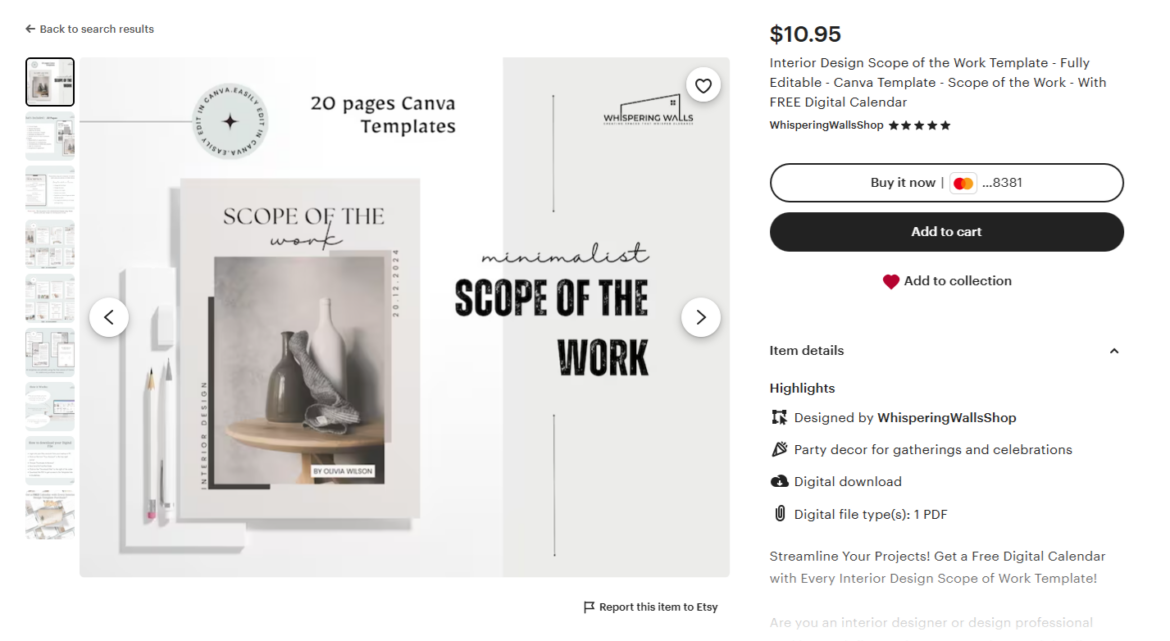
This minimalist interior design scope of work template is perfect for designers who love a clean, modern aesthetic. Designed in Canva, it’s fully editable and easy to customize with your branding. It includes 20 beautifully structured pages to outline project details, deliverables, and expectations. The neutral color palette and sleek layout make it both professional and stylish. Plus, it comes with a free digital calendar to help keep project timelines organized. Whether you’re managing a full-scale renovation or a simple styling project, this template helps you present your scope of work with clarity and confidence.
Template #2: A blue and gray Word template with instructions
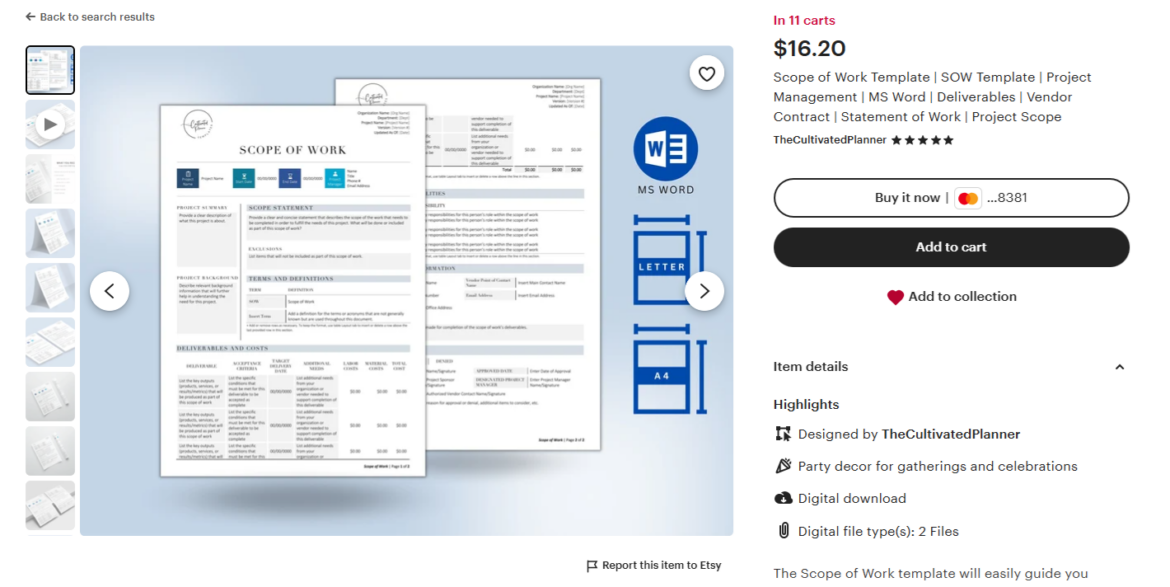
Use this scope of work template to clarify interior design projects. With a sleek blue and gray layout, it covers every detail, from project summaries to deliverables and responsibilities. Fully editable in Microsoft Word, it allows you to customize fonts, colors, and branding. It’s ideal for designers who want a polished, easy-to-follow document that keeps projects organized. The included instructions guide you through each section, making setup effortless. Whether finalizing vendor contracts or tracking project progress, this template helps create clear expectations and a smooth workflow from start to finish.
Template #3: A two-page Word or PDF template
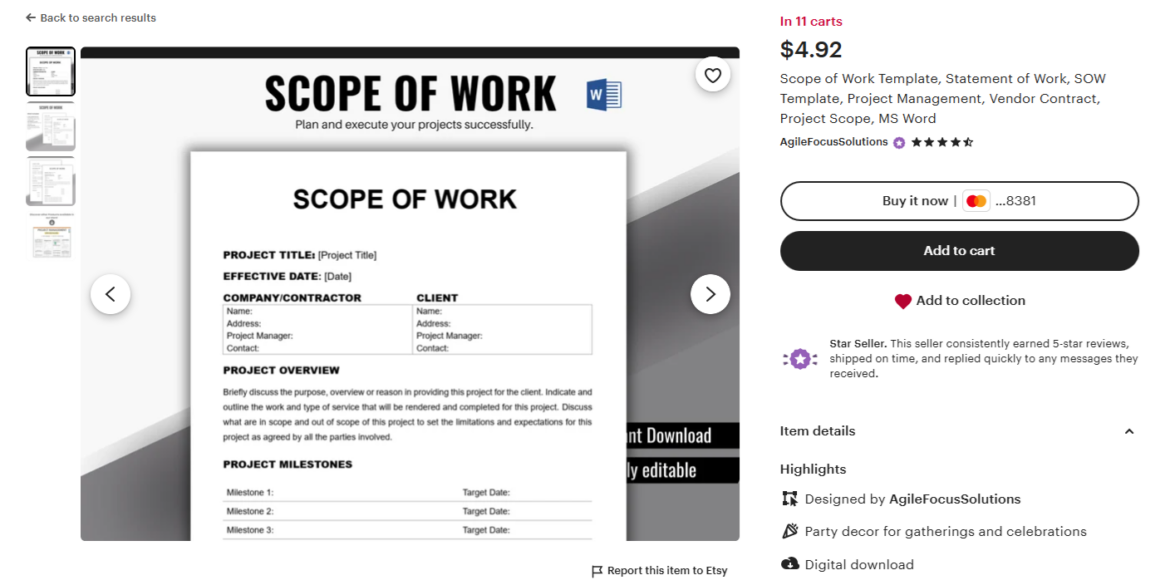
With this simple and professional scope of work template, designers get a no-fuss way to document project details. Available in Microsoft Word and PDF, it includes two easy-to-edit pages covering deliverables, milestones, and responsibilities. The clean layout ensures everything is clear and organized. Perfect for streamlining client agreements, vendor contracts, and project planning, this template keeps everything structured and stress-free.
Common mistakes to avoid
A scope of work keeps a project organized, but small mistakes can lead to big headaches. Being clear and thorough from the start helps avoid confusion later.
- Failing to clarify what’s NOT included: Clients need to know what falls outside the project to prevent last-minute requests that go beyond the original plan.
- Not specifying revision limits: Unlimited revisions can slow down progress. Setting clear limits keeps the project moving forward.
- Over-promising without checking feasibility: Design ideas should align with the budget, timeline, and available resources.
- Missing key legal clauses: Payment terms, revision policies, and termination conditions should always be included to protect both parties.
The final word? A well-defined scope of work keeps projects organized, sets clear expectations, and helps avoid misunderstandings. Make it a part of every project to stay on track and deliver a seamless client experience.
Manage scopes and streamline projects with DesignFiles
A scope works best when it connects to everything before and after it. In DesignFiles, that whole path lives in one place.
- Before the project: send a design questionnaire and shape your scope from the answers.
- At signing: start from a template or upload contracts you already use, then collect e-signatures.
- During the project: align clients and contractors with tasks, timelines, budgets, and product tracking.
- When it’s time to bill: send invoices clients can pay right from their portal.
Want to complete projects faster and with less stress? Learn more about DesignFiles, the top-rated platform for solo designers and small firms.