Finding the right moodboard tool sounds simple until you’re three free trials deep and still not sure which one actually fits how you work. Some are too basic for client-facing presentations. Others are packed with features you’ll never touch. A few look great until you realize the thing you actually need is locked behind a $99/month paywall.
I’ve tested every platform on this list to understand where each one genuinely delivers, and where it falls short. Whether you’re a professional interior designer trying to impress clients, a marketer aligning a creative team, or just someone who wants to stop screenshotting Pinterest into a Google Doc, this guide will help you make the right call fast.
What’s in this guide:
Table of Contents
What is moodboard software?
Moodboard software allows you to create visual representations of a creative concept or design project. Moodboards are great for communicating a specific design plan or for guiding an upcoming project.
Digital moodboards are used in several creative industries, including graphic design, web design, interior design, fashion, advertising, and marketing.
The primary purpose of a moodboard is to collect and organize visual elements, such as products, color palettes, textures, and other design elements in order to convey a particular mood or style.
Moodboard example
Here’s an example moodboard created with DesignFiles. This moodboard features a mix of realistic placements, creative placements, and swatches.

Types of moodboard software
There are a few different types of moodboard software.
- Moodboard design software – Many free graphic design platforms include moodboard templates and features to make it easy for anyone to develop a moodboard, whether to guide a DIY renovation project or serve as a vision board with dreams and goals.
- Moodboard software with shopping lists – You can also find moodboard software that will auto-generate shopping lists based on your design. This is great for both professional and personal use.
- Industry-specific platforms that include moodboards – Professional design platforms often offer moodboard creation alongside other business-critical features. You can find moodboard features inside of platforms built for interior designers, personal stylists, wardrobe designers, wedding planners, event planners, and filmmakers.
Benefits of choosing the right moodboard software
Moodboard software gives designers and creatives a structured way to communicate visual concepts before a single product is purchased or a single wall is painted. The right tool becomes a bridge between your creative vision and your client’s understanding of it.
The best platforms go beyond basic collage-making. They integrate with your sourcing workflow, auto-generate product lists, support client feedback, and fit inside a larger project management system without requiring you to juggle five different tabs.
Key benefits of using dedicated moodboard software:
- Faster client alignment. A polished visual presentation communicates design intent in seconds, reducing the back-and-forth that comes from describing concepts in words alone.
- Streamlined sourcing. Platforms with built-in product libraries or browser clipper tools let you drop real, shoppable products directly into your boards instead of hunting down images manually.
- Professional presentation. Branded, well-designed moodboards signal expertise and build client trust, which is especially important when you’re justifying premium pricing.
- Centralized feedback. Client comments and approvals attached directly to the board eliminate scattered email threads and version confusion.
- Reusable assets. Saved product libraries, brand kits, and past boards become a growing resource you can draw from project after project.
- Industry fit. The right platform integrates moodboarding with your broader workflow — whether that’s invoicing, floor planning, or production scheduling, so nothing lives in isolation.
How I selected the best moodboard software for 2026
I combined hands-on research with a review of verified user ratings to identify platforms that deliver real value across different use cases and budgets. Each tool was evaluated based on publicly available feature documentation, current pricing, and aggregated review data from Capterra, G2, and app stores. Only platforms with verifiable evidence across multiple signals made the final list.
Selection criteria used:
- Moodboard-specific features. I prioritized platforms with purpose-built moodboard tools, not just generic design editors. That means drag-and-drop editors, image layering, background removal, and templates designed for the task, not repurposed slideshow builders.
- Industry and audience fit. The right tool depends on who’s using it. I organized this list to clearly reflect which platforms are built for professionals (interior designers, filmmakers, brand marketers) versus general audiences, so you can filter quickly for your context.
- Product library and sourcing integration. For interior design use cases especially, I evaluated whether platforms include shoppable product libraries, browser clipper tools, or the ability to auto-generate item lists. I focused on features that save meaningful time in professional workflows.
- Collaboration and client-sharing capabilities. I looked for features that support real working relationships: real-time co-editing, client portals, comment threads, and approval workflows. Moodboards that live in isolation from your client communication are only half as useful.
- Verified ratings and review volume. Ratings predict real user experience better than marketing copy. I required verified reviews from Capterra, G2, or app stores, and weighted platforms with higher review counts more heavily, since larger samples reduce the noise of outliers.
- Pricing transparency and value. I included the full pricing picture for each platform, including free plan limitations and what you actually need to pay to access professional-grade features. Hidden paywalls around essential tools are flagged in the write-ups.
- Workflow fit beyond the moodboard. For professionals managing full projects, I considered how well each platform integrates with adjacent tools like floor planners, invoicing, project management, or production scheduling, since isolated moodboard tools create extra friction in a real workday.
Best moodboard software for 2026
Let’s take a look at the best moodboard software side by side and see how they compare.
| Platform | Built For | Pricing | Ratings | |
| Milanote | Web, iOS, Android | Creative professionals | Free; Paid from $9.99/mo | 4.7 stars (out of 56 reviews) on Capterra |
| Canva | Web, iOS, Android | Everyone | Free; Pro $13/mo; Teams & Enterprise | 4.7 stars (out of 11,449 reviews) on Capterra |
| DesignFiles | Web | Professional interior designers | $49–$69/mo; Enterprise custom | 4.6 stars (out of 525 reviews) on Capterra |
| Web, iOS, Android | Everyone | Free | 4.7 stars (out of 225 reviews) on Capterra | |
| Adobe Express | Web, iOS, Android | Everyone | Free; Premium from $9.99/mo | 4.6 stars (out of 1,114 reviews) on Capterra |
| Niice | Web | Brand marketers | Free; Paid from $83.25/mo (10 users) | 4.6 stars (out of 17 reviews) on G2 |
| Mural | Web, iOS, Android | Remote teams | Free; Paid from $9.99/mo | 4.6 stars (out of 119 reviews) on Capterra |
| StudioBinder | Web | Filmmakers | Free plan; Paid $49–$149/mo | 4.0 stars (out of 14 reviews) on G2 |
| Figma | Web | UX designers | Free; Paid $3–$90/mo | 4.6 stars (out of 1,696 reviews) on G2 |
| Visme | Web, iOS, Android | Everyone | Free; Paid $12.25–$24.75/mo; Enterprise custom | 4.5 stars (out of 876 reviews) on G2 |
| Programa | Web | Professional architects and interior designers | $47.20–$59/mo; Enterprise custom | 4.7 stars (out of 21 reviews) on Capterra |
| ShopLook | Web, iOS, Android | Stylists and fashionistas | Free; Paid $4.99–$6.99/mo | 4.7 stars (out of 4,500 reviews) on Apple App Store |
| PicMonkey | Web, iOS, Android | Everyone | $7.99–$23/mo | 4.5 stars (out of 1,101 reviews) on Capterra |
1. Milanote

With Milanote, you get a ton of flexibility to create collaborative moodboards, where you can add notes, images, videos, wireframes, and other resources. This platform can be used for any sort of creative project, from filmmaking to marketing to wedding planning.
Built for: Creative professionals
Moodboard features:
- Save text, images, and links from the web
- Upload images and videos
- Collaborate with team members on the same board
Other features:
- To-do lists
- Storyboards
- Whiteboards
- Creative briefs
- Note-taking
- Project management
- Mind-mapping
Pricing: Milanote offers a free plan with unlimited shared boards, but limits you to 100 items. For unlimited notes, images, and uploads, paid plans start at $9.99/month per user (billed annually). Teams of up to 10 pay $49/month total. Great for moodboard organization, but lacks interior design–specific tools.
Pros and cons: Milanote’s freeform canvas feels genuinely different from template-driven tools. It offers the ability to mix images, links, notes, and to-do lists on the same board makes it ideal for capturing messy, evolving ideas without forcing them into a rigid format. The 100-item cap on the free plan becomes frustrating quickly, and it lacks any product sourcing or shopping list features, which rules it out for design professionals who need those workflows. It’s the best fit for creative directors, marketers, web designers, and event planners who need a flexible visual thinking space rather than a polished client-facing deliverable. If you find Canva too template-heavy and just want a blank canvas to organize your thoughts, Milanote is the one to reach for.
Reviews: Milanote has an average rating of 4.7 stars (out of 56 reviews) on Capterra.
Software Platform: Web, iOS, Android
2. Canva

Canva is a very popular graphic design platform that lets anyone create beautiful moodboards, flyers, social media posts, and other assets—even if you have no previous design experience or skills. You can upload your own photos or search their photo library.
Built for: Everyone
Moodboard features:
- Moodboard templates
- Upload photos and graphics
- Store files for future use
- Animations
- Free and premium stickers and graphics
- Free and premium stock photos
- Store brand logos, colors, and fonts
- Built-in photo and video editing
Other features:
- Thousands of graphic design templates for other purposes
- Great for creating social media content
Pricing: Canva’s free plan grants drag‑and‑drop moodboard creation, basic templates, and 5 GB of storage. For moodboard creators seeking premium templates, 1 TB storage, background remover, Brand Kits, AI tools, and advanced exports, Canva Pro starts at about $13/month (or $120/year). Team and Enterprise plans add collaboration and brand governance features.
Pros and cons: Canva’s template library and drag-and-drop editor make it genuinely fast to produce something that looks polished, even with no design background. Plus, the free plan is more generous than most competitors. The downside is that it’s a generalist tool, so there’s no product library, no shopping list generation, and no way to connect your moodboard to a client portal or project workflow. It’s a great fit for DIY homeowners, content creators, small business owners, and anyone who needs a presentable visual board without committing to a paid plan. If you’re a professional interior designer, you’ll likely find yourself outgrowing it quickly. Visme handles more complex presentations better, and DesignFiles is purpose-built for the job.
Reviews: Canva has an average rating of 4.7 stars (out of 11,449 reviews) on Capterra.
Software Platform: Web, iOS, Android
3. DesignFiles
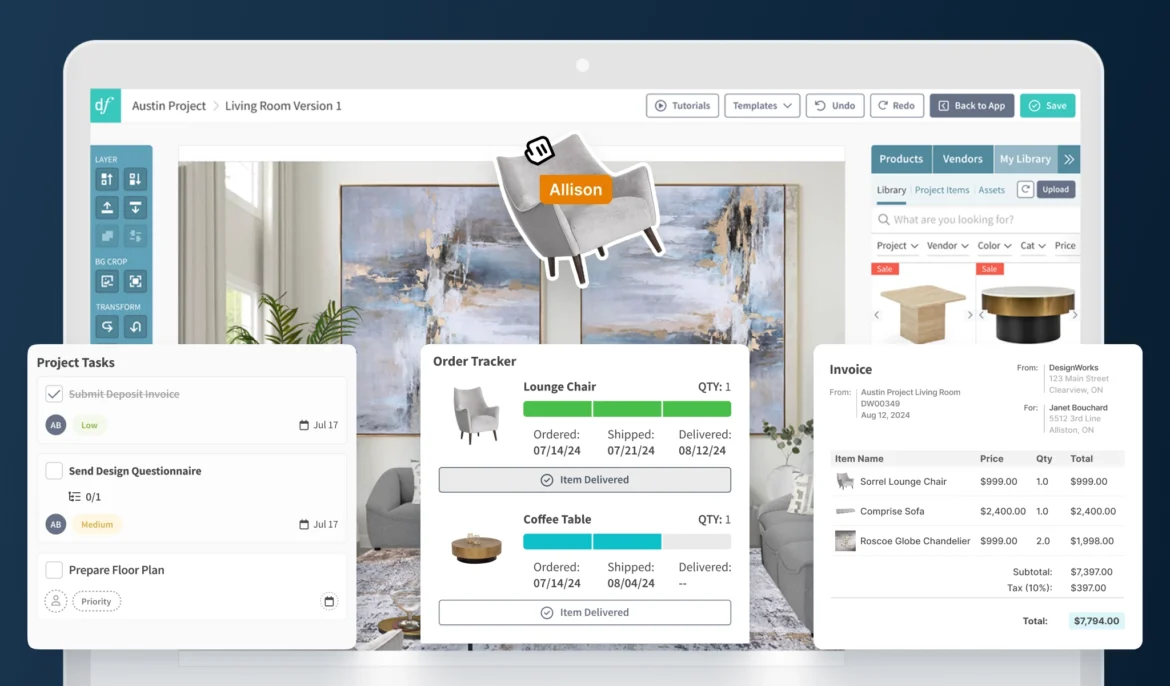
DesignFiles is an easy-to-use platform for professional interior designers who are looking to manage their entire interior design business from one place. It contains everything from moodboards to 3D floor plans, client communication, invoicing, task management and beyond.
Built for: Professional interior designers
Moodboard features:
- Ability to brand moodboards with brand colors and logos
- One-click image background removal tool
- Ability to scale, distort, crop and layer product images
- Built-in product library with 750K products from well known vendors
- Ability to upload your own images
- Built-in paint library including Benjamin Moore, Sherwin Williams, Dulux, and Farrow and Ball
- Browser extension product clipper to save items from anywhere online
- Auto-generate product lists and total costs from moodboards
- Easy moodboard feedback (comments and product approvals)
Other features:
- Floor planner
- 3D renderings
- Browser extension product clipper
- Customizable design questionnaires
- Client portal
- Client and team communication
- Quotes
- Invoices and retainers
- Online credit card and ACH payments
- RFQs and purchase orders
- Spec and tear sheets
- Branded PDF presentations
- Product tracker
- Task management and project calendar
- Time tracker
- Client / vendor contact list
- Activity log
- Digital contracts
- QuickBooks integration
- Financial reports
Are You Looking For a Moodboard Software?
“The Best Tool for Moodboard Design!”
“This product is VERY easy to use and learn. Within hours of purchasing I had created awesome moodboards from products I source everyday for my clients.”
Jolene D


Over 9,600 Designers Rely on DesignFiles Daily
Pricing: DesignFiles offers flexible plans for every type of design business. The e-Design plan starts at $49/month, Full Service is $69/month, and Enterprise plans are custom. Each plan includes unlimited projects, moodboards, invoices, and more. Additional users are $25/month. Try it risk-free with a 90-day money-back guarantee.
Pros and cons: The all-in-one workflow integration is where DesignFiles really pulls ahead. Being able to clip a product, drop it into a moodboard, auto-generate a shopping list, and send it to a client for approval without ever leaving the platform saves a surprising amount of time in practice. The trade-off is that it’s built exclusively for interior designers, so if you’re a stylist, filmmaker, or marketer, it simply won’t fit your workflow. DesignFiles is the strongest choice for professional interior designers who want to consolidate their tools rather than juggle separate apps for design, client communication, and invoicing. If you’re running a solo design practice or a small firm and you’re tired of copy-pasting between platforms, this is the one to try first.
Reviews: DesignFiles has an average rating of 4.6 stars (out of 525 reviews) on Capterra.
Software Platform: Web
4. Pinterest

Sure, Pinterest is a social media platform, but it’s also a great resource when it comes to making moodboards. Create digital moodboards simply by making Pinterest boards and adding different pins to them over time, or use the platform to store inspiration and later add your favorite photos to a moodboard software program.
Built for: Everyone
Moodboard features:
- Private or public boards
- Board collaboration
- Pin images and videos from the web
- Upload your own files
Features:
- Search and explore all sorts of content
- Follow other users for inspiration
Pricing: Pinterest is free to use.
Pros and cons: Pinterest’s biggest strength is also its most obvious one: the sheer volume of visual content you can browse, save, and organize into boards is unmatched, and it’s completely free. The weakness is that it’s a discovery and inspiration tool, not a design tool — you can’t layer products, remove backgrounds, add brand elements, or generate a shopping list. It’s best used as a starting point for gathering visual inspiration before moving that content into a proper moodboard tool like DesignFiles or Canva for client-facing work. If you’re a homeowner or hobbyist who just wants a place to save ideas, Pinterest alone does the job perfectly.
Reviews: Pinterest has an average rating of 4.7 stars (out of 225 reviews) on Capterra.
Software Platform: Web, iOS, Android
5. Adobe Express

Adobe Express (formerly known as Adobe Spark) is the software giant’s Canva competitor. Unlike InDesign, Illustrator, and other Adobe programs, Adobe Express is made for people who are not professional graphic designers. You can easily create all sorts of graphics from scratch or start with a template.
Built for: Anyone
Moodboard features:
- Moodboard templates
- Integrates with Adobe Stock
- Upload photos and graphics
- Photo and video editing
Other features:
- Thousands of graphic design templates
- AI image generation
- Ability to import Photoshop and Illustrator files
Pricing: The free plan is extensive enough for making moodboards, but you can opt for the Premium plan at $9.99 per month if you want to be able to resize your images and pull from the entire Adobe Stock collection. There are also more advanced plans for businesses that start at $7.99 per user per month.
Pros and cons: On the free plan, you get more than you’d expect, including background removal, moodboard templates, and access to a solid stock library make it a capable tool without spending anything. The limitation is that it doesn’t integrate with the rest of the Adobe Creative Suite the way you might expect, and professional designers who need InDesign-level control will hit its ceiling fast. It’s the best fit for small business owners and creative freelancers who are already in the Adobe ecosystem and want a lighter-weight design tool that doesn’t require the learning curve of Illustrator. If you’re deciding between this and Canva, Express has a slight edge for Adobe loyalists, but Canva’s template variety is wider for most general use cases.
Reviews: Adobe Express has an average rating of 4.6 stars (out of 1,114 reviews) on Capterra.
Software Platform: Web, iOS, Android
6. Niice

Niice is a unique sort of project management tool that lets you organize your work in moodboard format. Use it to collaborate creatively with marketers, writers, graphic designers, videographers, and other brand marketing professionals.
Built for: Brand marketers
Moodboard features:
- Moodboard templates
- Chrome extension to gather inspo
- Upload your own files
- Save files for future use
Other features:
- Collaborative workflows
- Approval processes
- Storyboard creator
- Brand guideline creator
- Project collaboration templates
- Digital asset libraries
Pricing: Niice offers a free plan with 5 boards and 100 uploads, making it ideal for testing out moodboard collaboration. Paid plans start at $83.25/month (billed annually) for 10 users with unlimited boards and 50 GB storage. Larger teams can scale with Growth or Enterprise plans, which unlock more storage, security, and brand customization features.
Pros and cons: Brand teams that need to organize visual assets, align on creative direction, and run structured approval workflows will find this genuinely useful. It fills a niche that general tools like Mural don’t address as specifically. The pricing is the sticking point: $83.25/month for 10 users is a big ask for small teams, especially when the moodboarding features alone don’t justify that cost unless you’re using it for the full brand management workflow. It’s the right fit for mid-sized marketing teams and brand managers who need a shared visual library and structured approval process, not just a mood-setting collage. If your team is smaller or your needs are simpler, Mural at $9.99/user/month covers similar collaborative ground at a much lower price.
Reviews: Niice has an average rating of 4.6 stars (out of 17 reviews) on G2.
Software Platform: Web
7. Mural

Mural is a collaborative whiteboard and moodboard software that’s great for engineering, UX design, product, or marketing teams.
Built for: Remote teams
Moodboard features:
- Moodboard template
- Blank whiteboard
- Upload your own files
- Add colors and textures
Other features:
- Dozens of other diagram and brainstorming templates
- Project collaboration templates
- Strategy planning
- OKR tracking
- Diagrams, flowcharts, and process mapping
Pricing: Mural offers a free plan with up to 3 boards and unlimited viewers, making it ideal for lightweight moodboarding. Paid plans start at $9.99/month per user (billed annually) for unlimited murals and collaboration tools. Business and Enterprise plans add SSO, advanced integrations, and guest access, which is useful for teams managing larger, more complex visual projects.
Pros and cons: Real-time collaboration is where this tool genuinely earns its place, using it in a live workshop or working session with a distributed team feels noticeably smoother than most alternatives, and the template library for structured exercises is extensive. Where it falls short is on visual polish: boards can look chaotic without intentional organization, and it’s not designed to produce client-ready deliverables. It’s the best fit for product teams, UX researchers, and operations professionals who use moodboarding as part of a broader ideation or planning process, not as a final output. If you’re a solo creative or need something client-facing, Canva or DesignFiles will serve you better.
Reviews: Mural has an average rating of 4.6 stars (out of 119 reviews) on Capterra.
Software Platform: Web, iOS, Android
8. StudioBinder

StudioBinder is an all-in-one solution for filmmakers. It offers tons of useful features to help you map out every stage of production, from scriptwriting to shot lists to post-production. A moodboard app is included as part of the platform.
Built for: Filmmakers
Moodboard features:
- Moodboard templates for filmmaking (spaces for characters, costumes, props, locations, and more)
- Upload photos and videos
- Built-in image editing
Other features:
- Storyboard software
- Call sheet templates
- Shooting schedules
- Production calendar
- Film crew management
- Script breakdowns and tagging
- Shot list management
- Music and sound effects
Pricing: StudioBinder offers a Starter plan for $49 per month, an Indie plan for $99 per month, and a Professional plan for $149 per month. You can also test things out with their free plan, which covers pre-production from scripting to call sheets.
Pros and cons: StudioBinder’s moodboard feature is built specifically around film production contexts. It includes character references, location scouting, costume direction, which makes it far more useful than a generic tool for that use case. That same specificity is its limitation: outside of film and video production, there’s no reason to pay $49–$149/month for moodboard functionality you could get elsewhere for free. It’s the clear choice for independent filmmakers, directors, and production coordinators who are already using StudioBinder for shot lists and call sheets and want their visual references in the same place. If you’re not in film, the pricing doesn’t make sense when Milanote or Mural cover creative collaboration at a fraction of the cost.
Reviews: StudioBinder has an average rating of 4.0 stars (out of 14 reviews) on G2.
Software Platform: Web
9. Figma
Figma is best known as a UX design platform, but its drag-and-drop tools and moodboard templates make it a surprisingly flexible space for creative exploration. You can test color palettes, mix typography, and play with layout styles—all in the browser, no downloads required. It’s a great choice if your moodboard needs to live inside a bigger digital design workflow.
Built for: UX designers
Moodboard features:
- Moodboard templates
- Drag-and-drop editor
- Live collaboration
- Typography and color testing
- Image grid layouts
- Web-based access
- Plugin-friendly
Other features:
- UI and UX design tools for web and mobile apps
- Prototyping and interactive design previews
- Dev Mode for developer handoff with specs and code snippets
- FigJam for brainstorming, whiteboarding, and team workshops
- Figma Slides for collaborative presentations
- Figma Sites for designing and publishing websites
- Figma Make (AI) for generating code, designs, and layouts from prompts
Pricing: Figma offers a free Starter plan with unlimited drafts, templates, and moodboard-friendly tools. For more features, paid plans start at $3/month (collab seat) or $16/month for full access. Higher tiers like Organization and Enterprise ($55–$90/month) unlock advanced design systems, admin tools, and security. This platform is deal if your moodboards live inside larger UX workflows.
Pros and cons: What sets it apart is that the moodboard tools are a byproduct of a genuinely powerful design system. It offers precise layouts, real typography testing, live collaboration, and a plugin ecosystem that extends what’s possible. The learning curve is real though: if you haven’t used Figma before, setting up a moodboard takes considerably longer than it would in Canva or Milanote, and it can feel like overkill for a simple inspiration board. It’s the best fit for UX and product designers who want their moodboard to live inside the same file as their wireframes and prototypes, keeping everything in one workspace. If moodboarding is your primary use case rather than one step in a broader design workflow, the investment in learning the tool probably isn’t worth it.
Reviews: Figma has 4.6 stars (out of 1,696 reviews) on G2.
Software Platform: Web
10. Visme
Visme offers an intuitive moodboard maker built into its all-in-one design platform for graphics, documents, and presentations. Whether you’re mapping out visual ideas or aligning creative direction, Visme’s drag-and-drop editor and flexible templates help you move from inspiration to polished presentation fast. It’s a versatile choice for both designers and non-designers alike.
Built for: Everyone
Moodboard features:
- Drag-and-drop editor
- Customizable moodboard templates
- Real-time team collaboration
- Upload your own images and fonts
- Interactive elements (links, hover effects)
- Brand Kit with saved colors and styles
- Download and share in multiple formats (PNG, JPG, PDF, HTML)
Other features:
- Presentation and slideshow builder
- Infographics and data visualization tools
- Social media graphic templates and scheduler
- Branded document and report creation
- Real-time team collaboration and feedback
- Interactive content with animations, popups, and links
- Workspace and brand asset management for teams
Pricing: Visme’s free plan includes unlimited projects and basic templates. Paid plans start at $12.25/month for access to premium assets and downloads. The Pro plan ($24.75/month) adds video exports, brand tools, and analytics. Enterprise pricing is custom and includes SSO, advanced security, approvals, and dedicated onboarding for larger teams.
Pros and cons: The ability to turn a moodboard into an interactive presentation with hover effects, clickable links, and embeds is what sets this apart from tools like Canva that stop at static exports. The free plan is fairly limited in practice, and accessing the features that make Visme genuinely useful requires the paid tier. It’s a strong fit for marketers, educators, and business professionals who need to present visual concepts in a way that goes beyond a PDF, especially when those presentations need to be shared online rather than printed. If you’re an interior designer, it’s worth considering alongside Canva for client presentations, though DesignFiles integrates that workflow more seamlessly with the rest of a design business.
Reviews: Visme has a 4.5 star rating out of 876 reviews on G2.
Software Platform: Web
11. Programa

With its focus on project spec sheets and schedules, Programa is a fit for architects and interior designers who offer home renovation services.
Built for: Professional architects and interior designers
Moodboard features:
- Product library
- Web clipper
Other features:
- Construction project spec sheets and schedules
- Project management
- Purchase order management
- Client invoices
Pricing: Programa starts at $59/month per user (Basic plan) or $47.20/month billed annually. All plans include unlimited projects, full access to features like moodboards, schedules, product libraries, invoicing, QuickBooks/Xero integrations, and real-time collaboration. The Enterprise plan offers custom pricing, SSO, and dedicated support for large teams. Every plan includes live chat help and free training.
Pros and cons: For architects and renovation-focused designers, having product specifications, moodboards, and purchase orders in the same platform removes a real pain point that most tools on this list ignore entirely. The moodboard tools themselves are more limited compared to DesignFiles: the product library is smaller and the visual customization options are less refined, so if moodboard quality is a priority, that’s worth factoring in. It’s the best fit for architecture-adjacent interior designers and renovation specialists who need strong specification and procurement tools and are less focused on producing highly polished design presentations. If you’re a full-service interior designer whose work leans more toward residential decorating than construction, DesignFiles will likely feel like a better match.
Reviews: Programa has an average rating of 4.7 stars (out of 21 reviews) on Capterra.
Software Platform: Web
12. ShopLook

ShopLook is a fun moodboard creator for pro stylists or anyone who wants to up their fashion game. If you’ve been missing Polyvore since it shut down, this is the app for you.
Built for: Stylists and fashionistas
Moodboard features:
- Auto-remove backgrounds from any image
- Make product images shoppable with affiliate links
- Add text overlays
Other features:
- Follow other users and comment on their designs
Pricing: ShopLook is free. There is a paid plan for $4.99 per month that gives you access to additional fonts and editing features. The Premium plan for $6.99 unlocks all features.
Pros and cons: This is easily the most fun tool on this list. ShopLook lets you build fashion moodboards with shoppable product links and auto-removed backgrounds. It’s fast, intuitive, and genuinely enjoyable to use. The ceiling is low though: it’s a consumer-grade tool, and professional stylists managing client projects will eventually need features like invoicing, client portals, or branded deliverables that ShopLook doesn’t offer. It’s the perfect fit for fashion bloggers, personal stylists building a social media presence, and anyone who misses the Polyvore era of outfit collages. If you’re a professional stylist with clients to manage, ShopLook works great for the visual side, but you’ll need a separate business tool to handle the rest.
Reviews: ShopLook has an average rating of 4.7 stars (out of 4,500 reviews) on the Apple App Store.
Software Platform: Web, iOS, Android
13. PicMonkey

Like Canva, PicMonkey is a photo editing and graphic design app that’s easy enough for anyone to use. However, the lack of a free plan as well as the advanced collaboration features make this a better fit for professional use cases.
Built for: Everyone
Moodboard features:
- Moodboard templates
- One-click background removal
- Built-in image editing
- Brand kit (save your logos, colors, and fonts)
- Upload your own fonts
- Digital asset management with file tagging
- Real-time collaboration and co-editing
Other features:
- Thousands of graphic design templates for any purpose
Pricing: PicMonkey offers three plans: Basic at $7.99/month, Pro at $12.99/month, and Business at $23/month per user. All plans include design tools, templates, and photo editing. Pro adds unlimited cloud storage and brand kits, while Business unlocks collaboration features like co-editing, commenting, team folders, and user permissions for creative teams.
Pros and cons: The photo editing capabilities here are noticeably stronger than Canva’s at the same price point. If you’re working with real product photos that need touching up before going into a moodboard, that difference matters in practice. The lack of a free plan is a genuine barrier to entry, especially when Canva offers so much for free, and the template variety is narrower. It’s the best fit for professional photographers, small creative agencies, and business owners who need both photo editing and design capabilities in one subscription and don’t want to pay for separate tools. If you’re primarily making moodboards and photo editing is a secondary need, Canva’s free plan is the more practical starting point.
Reviews: PicMonkey has an average rating of 4.5 stars (out of 1,101 reviews) on Capterra.
Software Platform: Web, iOS, Android
How to choose the right moodboarding software
Use these tips to choose a platform that will save you time and make the creative journey more enjoyable.
Consider your design workflow
To choose the right moodboard software, consider your entire workflow. What sorts of images and products do you want to add to your moodboard? How do you plan to use and share your moodboard after you make it? If you just want to create a quick grid-style or collage-style board for inspiration, use Pinterest or Canva.
But if you want to pull in products, add affiliate links, and auto-generate shopping lists, try a platform built for your industry, which leads into our next point.
Choose a design platform that fits your industry
And lastly, if you’re looking to bring more of your creative workflow under one roof, opt for an all-in-one software platform designed for your specific industry. For example, StudioBinder helps filmmakers manage movie projects while DesignFiles makes it easy to manage interior design projects for clients.
Frequently asked questions about moodboard software
Get answers to the most common FAQs.
If you’re looking to create a quick and easy moodboard online for free, use a simple graphic design platform like Canva or Visme. If you want to engage with other users and share your creations, try making your moodboard with Pinterest or ShopLook instead.
If you’re looking for moodboard software that does a little bit of everything, Canva and Visme are your go-to gals. Canva is perfect for super quick, drag-and-drop moodboards with a huge library of templates and graphics—ideal for DIYers, small biz owners, and content creators. Visme brings more power to the party with interactive features, real-time collaboration, and loads of export options, making it a fab choice for teams and professionals who need their moodboards to work a little harder.
DesignFiles is hands-down the top choice for interior designers. It’s more than just a moodboard maker, it’s your all-in-one project hub where you can clip products, build branded boards, auto-generate shopping lists, and collect client feedback (all without the back-and-forth emails). Whether you’re managing a single-room makeover or a full-home renovation, DesignFiles helps you stay creative and organized.
ShopLook is a stylist’s dream. It lets you easily build fashion-forward moodboards with drag-and-drop tools, auto-remove backgrounds, and even make product images shoppable with affiliate links. Whether you’re planning outfits, curating seasonal looks, or working with clients, ShopLook gives you everything you need to create stylish, scroll-stopping visuals.
Milanote is a go-to favorite for marketers who want to mix strategy with visual inspiration. You can map out campaigns, drop in images and links, add creative briefs, and even sketch out workflows—all in one collaborative space. It’s like having a moodboard and marketing notebook rolled into one beautifully organized board.
Milanote is perfect for web designers who need a flexible canvas to gather inspiration, sketch layouts, and organize visual ideas. Its drag-and-drop interface makes it easy to combine moodboard elements with notes, links, and wireframes. Whether you’re designing a site solo or collaborating with a team, Milanote keeps everything beautifully on track.
Canva and Mural both shine as moodboard programs for graphic designers, but in different ways. Canva is ideal for creating polished, presentation-ready moodboards with its stylish templates and easy drag-and-drop tools. Mural, on the other hand, is better for collaborative exploration. It’s perfect for mapping out visual ideas and gathering team feedback in real time.
Figma is a UX designer’s dream when it comes to moodboarding. With its browser-based interface, real-time collaboration, and seamless integration with the rest of your design workflow, Figma makes it effortless to experiment with layouts, color palettes, and typography. Plus, you can go from moodboard to wireframe to prototype, all in one place.
Milanote is perfect for event and wedding planners who want to visually organize inspiration, themes, and logistics in one gorgeous board. Easily drag in photos, color palettes, to-dos, and vendor details. Then share with clients or collaborators for feedback. It’s like your creative planning notebook… but prettier and way more organized.
Looking for moodboard software? DesignFiles is the top-rated interior design platform, offering all the tools you need to create stunning designs and interact with clients. Start your free trial.
Are You Looking For a Moodboard Software?
“The Best Tool for Moodboard Design!”
“This product is VERY easy to use and learn. Within hours of purchasing I had created awesome moodboards from products I source everyday for my clients.”
Over 9,600 Designers Rely on DesignFiles Daily

![Top 9 Interior Design Project Management Software [2026]](https://blog.designfiles.co/wp-content/uploads/2024/06/AdobeStock_215623020-768x512.jpeg)