
Your renewal quote landed, and the number moved. Again.
So now you have two tabs open. Houzz Pro in one, Studio Designer in the other, and a growing suspicion that neither company wants you to know what you will actually pay. You are right about that, by the way. Researching this comparison is harder than it should be.
Here is what makes this guide different. Both current price lists are published below, side by side, checked in September 2026. Most comparisons skip that part. Studio Designer’s own comparison page lists Houzz Pro’s price as “available upon request.” Not enormously helpful when you are the one holding the card.
In six years of running workshops for designers, I have never once seen someone switch platforms because of a feature list. They switch because a renewal notice arrived and the number had moved.
So let’s start with the money. Then we can talk about which platform earns it, and what happens to your bill the day you hire someone.
Table of Contents
Where Houzz Pro and Studio Designer actually split
Both platforms will happily tell you they run your entire design business. Only one of them will run your books.
That is the real split, and it holds up better than the feature-list comparisons you will find elsewhere. Houzz Pro sells you demand, plus the tools to service it. You get marketplace leads from the Houzz consumer site, a CRM to chase them, and design and project tools to deliver the work you win. Studio Designer sells you operational control over money. Proposals become purchase orders, purchase orders become invoices, and all of it lands in a real general ledger without a second system.
The older version of this comparison said Studio Designer has no design tools. That is no longer accurate, and we have corrected it below. Studio Designer also now sits under the same company as Mydoma, which changes the shape of your options if you are shopping today.
What changed since this comparison was last written
Three things have shifted, and each one breaks an assumption you may be carrying.
Houzz Pro restructured its designer plans. The tiers are now Design, Pro and Teams. “Essentials” no longer exists on the designer-facing pricing page. There is also a permanently free plan now, carrying the 3D floor planner, estimates and invoicing.
Studio Designer added design features. Its pricing page lists Catalog plus AI rendering under Design and Project Management, and the site carries dedicated Design Tools and Embedded AI pages. Whether that depth rivals a purpose-built design platform is a separate question, and one we have not tested.
Studio Designer and Mydoma have joined forces under one company. They still run as two separate products with different strengths, and it is worth understanding what the Mydoma consolidation changed before you commit to either.
What each platform actually does
Feature lists are easy to skim and hard to act on. So here is what each platform gives you, and what it means for your week.
Houzz Pro’s main features include:
- Floor planning, mood boards, and photorealistic rendering
- Web clipper tool
- Visual project tracker and schedule tool
- Client dashboard and collaboration features
- E-signatures and approvals
- Change order forms
- Invoicing and online payment processor
- Takeoffs, bid management, and budget management
- Contracts, project schedule, and daily logs
- Quickbooks integration
- Financial reports with time and expense trackers
- Marketing perks, including a custom website, targeted ads, and lead generation
Note where those last few sit. Takeoffs, bid management, contracts, schedules and daily logs are gated to the Pro tier and above, not the entry plan. If contracts are the reason you are shopping, you are shopping at $199, not $99. Worth knowing before the demo call. If you need a hand with the document itself, we have a guide to writing the contract itself.
Studio Designer’s main features include:
- Sourcing and procurement tools
- Catalog with AI rendering
- Inventory and calendar management
- Branded client documents and a portal for online payments, document sharing, and approvals
- Detailed financial reports, including design-specific forms
- Accrual accounting
- Overhead and expense tracker
- Cash flow and tax calculations
- Accounts receivable and accounts payable
- StudioPay and Gusto payroll integration
- General ledger, where proposals, invoices, and payments are recorded automatically
The general ledger is the headline here, and it is genuinely rare. Nothing else on your shortlist replaces your accounting software outright. That is the trade on offer. Whether it is worth it depends on how much of your month disappears into reconciliation.
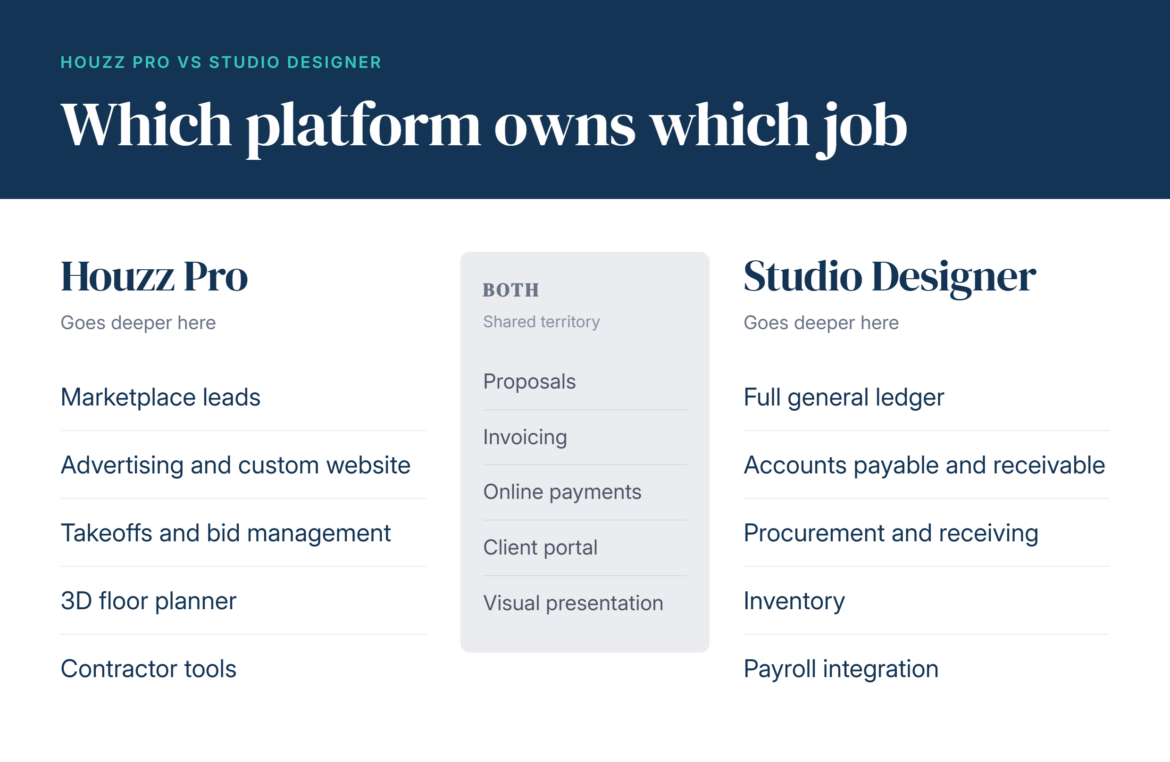
Where the two overlap, and where they do not
The overlap is bigger than either company’s marketing suggests. Proposals, invoicing, online payments, a client portal and some form of visual presentation now appear on both.
Two things genuinely separate them:
- Houzz Pro brings you inbound leads. Studio Designer does not, and no amount of feature parity changes that.
- Studio Designer runs a real general ledger. Houzz Pro pushes to QuickBooks Online instead.
Everything else is a question of depth and preference. That is not a cop-out, it is the honest read, and it means your decision rests on two questions rather than forty.
What Houzz Pro and Studio Designer cost in 2026
Both price lists below were checked in September 2026. That date matters more than usual here. Pricing has moved on both platforms. Plenty of comparisons you will find are still quoting 2024 numbers, confidently.
Houzz Pro pricing
Houzz Pro publishes three designer plans. Design is $99 per month and covers 3D floor plans, selections, the product clipper and library, mood boards, CRM, estimates, proposals, invoices and online payments. Pro is $199 per month and adds takeoffs, bid management, change orders, budget management, contracts, project schedule, daily logs and a Gusto integration in beta. Teams starts at $399 per month and adds unlimited users, AI note-taking, a premium profile, email marketing, a custom website and dedicated support.
Design and Pro each include one seat. Every person you add after that is $50 a month. An advertising package sits on top of any plan, starting at $499 per month.
There is also a permanently free plan. It carries the 3D floor planner, estimates and invoicing. A reasonable way to test the presentation tools before you spend anything. The paid trial runs 30 days and converts to an annual subscription, so read those terms carefully.
One wrinkle worth knowing. Houzz Pro shows different pricing depending on whether you sign up as a designer or a contractor. That is why third-party reviews quote wildly different figures for the same product. The number a builder friend quotes at you may not be the number you see.
Studio Designer pricing
Studio Designer charges per user, with three plans on annual billing. Essentials is $69 per user per month, a streamlined set of project management and accounting features with limited customization and support. Professional is $79 per user per month, a comprehensive feature set with a broader range of customization and support. Premier is $109 per user per month, adding high-touch service including priority email response, a year-end financial review and early access to new products.
Annual billing discounts against monthly. Monthly rates are higher.
What each one actually costs at two, three, and five seats
Here is the part almost nobody publishes, and the part that decides your bill.
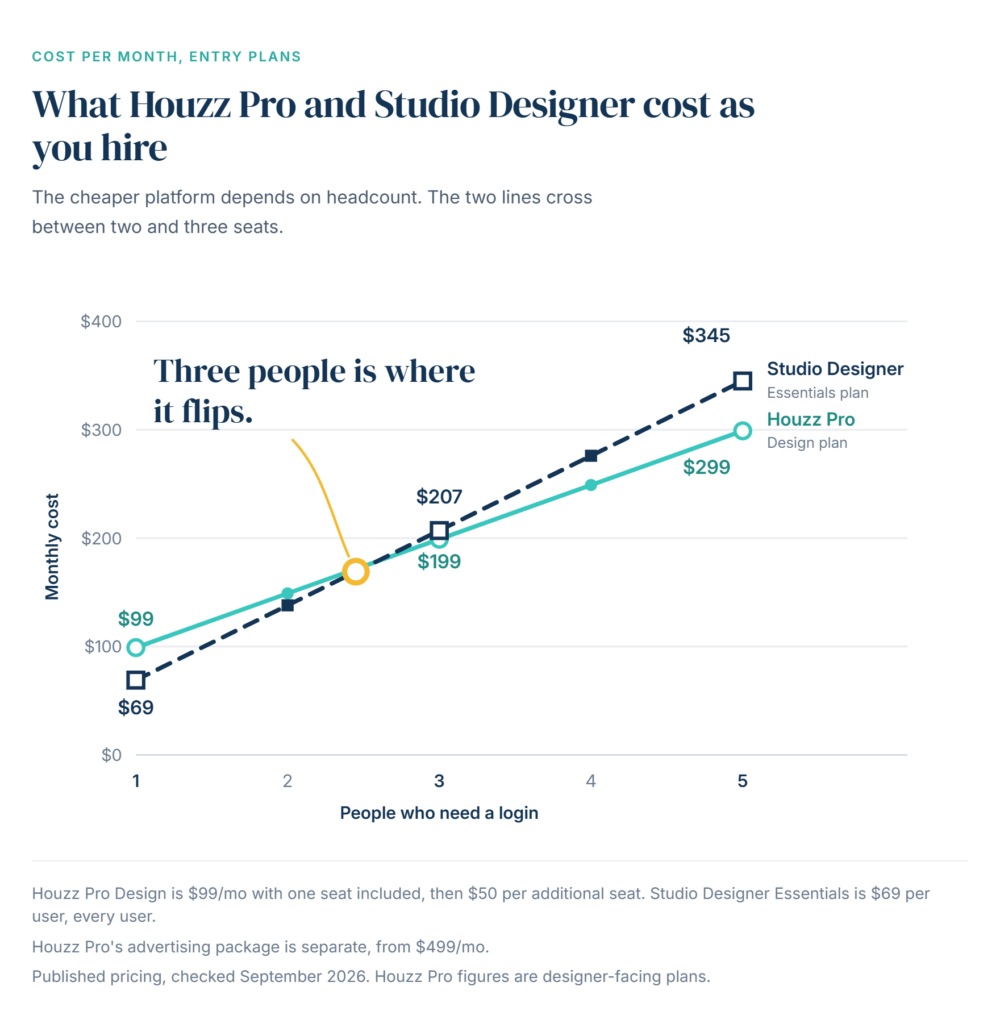
The two platforms charge in opposite directions. Studio Designer charges the full plan price for every seat. Not a reduced rate for extra users. The full price. Houzz Pro includes one seat on Design and Pro, then charges $50 a month for each person after that.
Run it forward on the entry plans and the cheaper platform actually swaps places.
| Team size | Houzz Pro Design | Studio Designer Essentials | Cheaper |
|---|---|---|---|
| Just you | $99 | $69 | Studio Designer, by $30 |
| Two people | $149 | $138 | Studio Designer, by $11 |
| Three people | $199 | $207 | Houzz Pro, by $8 |
| Five people | $299 | $345 | Houzz Pro, by $46 |
Three people is the crossing point. Below it, Studio Designer is cheaper. Above it, Houzz Pro pulls ahead and keeps pulling.
Notice what happens at three seats on Houzz Pro. You are paying $199 a month, which is exactly the price of the Pro plan with a single seat. Same money, smaller feature set. Worth knowing before you add that third login.
Every login on Studio Designer costs the same, too. Your bookkeeper costs what your senior designer costs. If that gives you pause, see how Studio Designer against Design Manager handle extra users. The models are not the same.
One figure sits outside all of this. Houzz Pro’s advertising package is what actually puts you in front of homeowners. It starts at $499 a month, sold separately from the software.
I ask designers in my workshops what their software costs per month. Most of them can name the base price. Almost none can name the per-seat number, and that is the one that changes the month they hire.
One designer I worked with ran a two-person studio and had budgeted for the base subscription only. She hired a junior in March, added a bookkeeper login in June, and by the autumn her software line had grown by more than half. Not one new feature had arrived. She had simply never priced the second and third seat before she needed them.
Price the software for the team you will have next year. Not the one sitting in your studio this morning.
I ask designers in my workshops what their software costs per month. Most of them can name the base price. Almost none can name the per-seat number, and that is the one that changes the month they hire.
One designer I worked with ran a two-person studio and had budgeted for the base subscription only. She hired a junior in March, added a bookkeeper login in June, and by the autumn her software line had grown by more than half. Not one new feature had arrived. She had simply never priced the second and third seat before she needed them.
What designers say in their reviews
Ratings are useful here, but only if you read them correctly.
Houzz Pro holds 4.3 out of 5 across 1,085 verified reviews on Capterra and 4.1 out of 5 stars, with 67 reviews, on G2.
Studio Designer sits at 3.0 out of 5 on Capterra, across a far smaller review base.
Now the part the star ratings will not tell you. A platform with over a thousand reviews and a platform with a handful are not being measured with the same instrument. One number reflects years of feedback across a huge user base. The other reflects whoever happened to write in. Read them as rough signals, and weight your own demo far more heavily than either.
The support you get, and the tier it takes to get it
Support sounds like a footnote until the week your invoices will not sync.
Houzz Pro offers live on-demand training sessions and an online help center full of guides and video tutorials. There is also a pro forum where you can get advice from other subscribers. The mobile app has built-in chat for reaching a support rep quickly.
Studio Designer has an online help center with articles, guides and videos. Weekly webinars and expert-led courses cover more personalized training. Human support is gated by tier. The pricing page lists AI chat and email support, human chat support, a ticket portal and priority email response. Call requests are capped on lower plans and unlimited higher up. Premier adds a year-end financial review and early access to new products. Confirm which plan unlocks what on your demo. It affects what you should budget.
Which one fits how you actually work
Forget both feature lists for a second and look at your calendar instead.
Houzz Pro may be the right fit if you:
- Want leads coming to you rather than chasing them
- Work with contractors regularly
- Need built-in marketing tools, a custom website or advertising
- Have a growing team and want to avoid paying full price per seat
Studio Designer may be the better option if you:
- Want your accounting inside the same platform as your projects
- Run heavy procurement with vendor deposits and purchase orders
- Need reporting your bookkeeper’s spreadsheet can no longer give you
- Already have design software you know and love
Every designer I have watched outgrow their software outgrew it in the same place. Not the design tools. The month end.
Both platforms share one honest limitation. Each expects you to run a second tool for the half it does not cover. With Houzz Pro that is usually your accounting. With Studio Designer it is usually your client-facing design work.
A third option built for solo designers and small firms
Houzz Pro and Studio Designer have fairly specific client bases, so they aren’t going to be a good fit for every interior designer. If you want the full picture first, we compare eleven Houzz Pro alternatives side by side, with what each one costs. For an all-in-one option built for solo designers and small firms, we recommend DesignFiles.
DesignFiles offers:
- Mood boards, floor planner, and 3D renders
- Built-in, customizable product library
- Browser extension product clipper
- Ability to shop items and add affiliate links
- Spec/FFE schedules
- Project calendars
- Task management
- Time tracker
- Presentation slide decks
- Digital contract creation and sending/signing
- Customizable questionnaires
- Client portal for document sharing, feedback, and payments
- Team collaboration capabilities (including project-side discussions with clients and team members)
- Ability to sell online design packages
- Branded PDFs for client presentations
- Quotes, invoices, and the ability to accept online payments
- Basic financial reports and Quickbooks integration
That fourth bullet is quietly one of the most useful. You can add affiliate links to the products you spec, which turns sourcing you already do into revenue that helps cover the subscription.
DesignFiles is rated 4.6 out of 5 from 535+ ratings.
Support includes an online library of video tutorials and articles, live training and webinars, human-based chat, and a large user community. Pricing is lower than both platforms above. Plans start at $55 per month for e-designers and $75 per month for full-service business owners, with additional users at $30 per month.
Are you ready to learn more? Sign up for a trial account today. Your first project is free.
Houzz Pro vs Studio Designer FAQs
It depends entirely on your headcount. Solo, Studio Designer wins at $69 against Houzz Pro’s $99. At three people that flips, because Studio Designer charges $207 while Houzz Pro charges $199. Also weigh what each tool lacks. Studio Designer needs a design tool alongside it. Houzz Pro needs accounting. Either way, the right design business software may mean a second subscription.
Studio Designer is generally preferred by design firms. The software is built specifically for designers, and its accounting depth can remove the need for outside bookkeeping. If you want strong project management without in-depth accounting, these alternative project management tools are worth a look before you commit to a per-seat model.
Yes. This is the single most out-of-date claim you will read about the platform. Studio Designer’s pricing page now lists Catalog with AI rendering under its design and project management features. The company also runs dedicated design tools and embedded AI pages. Older comparisons still say it has none. Whether that depth matches a purpose-built design platform is worth testing on a demo.
Houzz Pro is more budget-friendly for teams. Your first seat is full price and everyone after is $50. Studio Designer charges the full plan price per user, so five people on Essentials means five times $69, or $345 against Houzz Pro’s $299. Studio Designer’s higher tiers do offer more granular permission control, which may be worth the difference if you need it.
Houzz Pro includes mood boards, online payments and client-facing dashboards that support an e-design workflow. Studio Designer has no features built specifically for remote or digital design services. If e-design is a big part of your business, compare software built for e-design. A platform like DesignFiles, created with that model in mind, may suit you better.

![Top 9 Interior Design Project Management Software [2026]](https://blog.designfiles.co/wp-content/uploads/2024/06/AdobeStock_215623020-768x512.jpeg)